





SYNAPSE — Neuromuscular Interface Chip
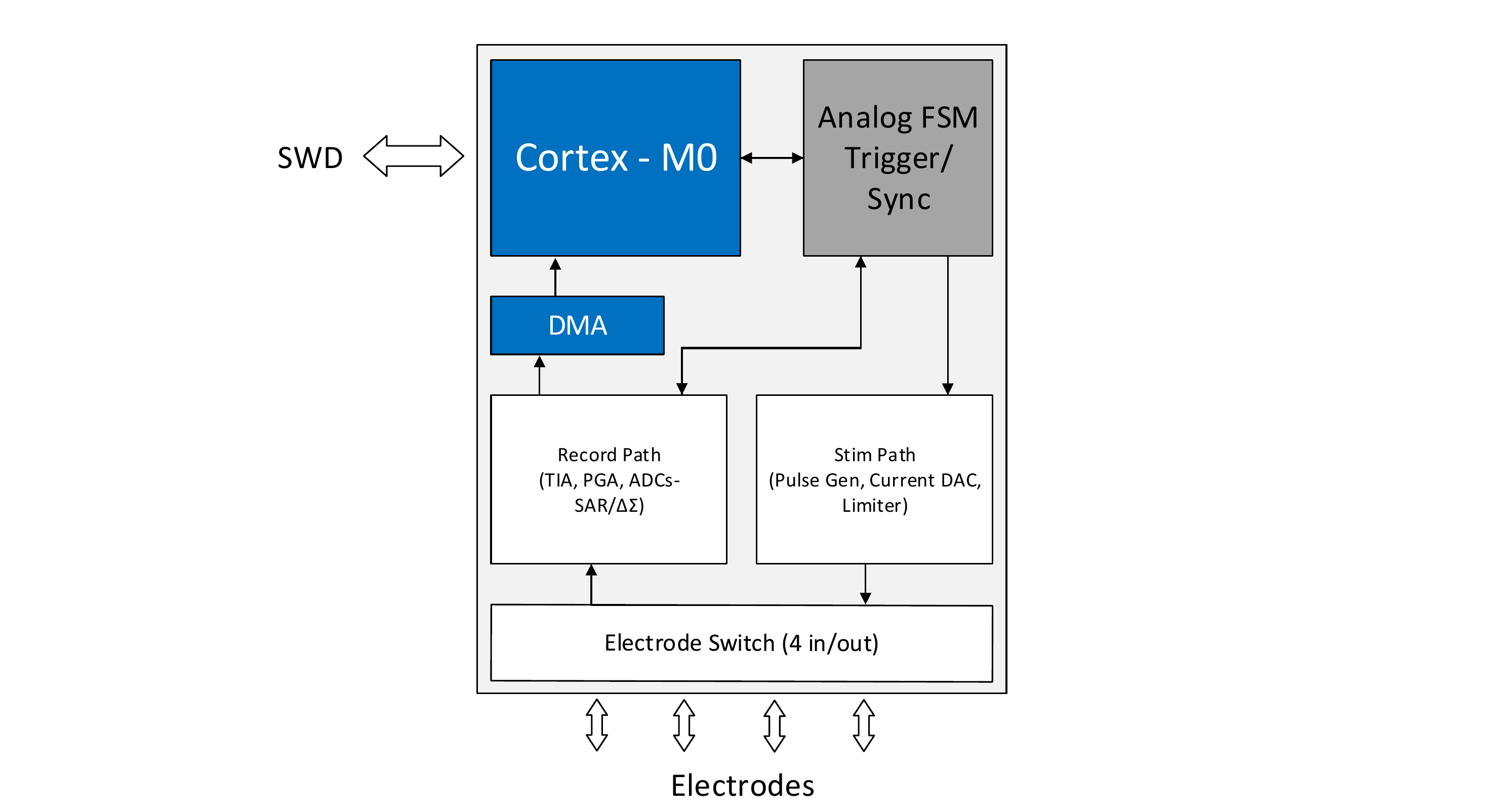
A custom chip project for recording and stimulating nerve/muscle signals, sensing an electrode's electrical activity and delivering safe, controlled electrical pulses back to it. Built around an analog front-end and dual-mode data converters for capturing both fast signal spikes and slow baseline drift, plus a closed-loop stimulation path with hardware-level safety limiting to keep delivered current within safe bounds.
Project Milestones
Do you want to view information on how to complete the work stage ""
or update the work stage for this project?
-
Getting Started
Design FlowTarget DateCompleted DateA custom SoC for recording and stimulating nerve and muscle signals: it senses an electrode's electrical activity and delivers safe, controlled pulses back through the same electrodes. Built on the nanoSoC reference design with an Arm Cortex-M0.
It combines an analog front-end and dual-mode data converters (fast SAR for spikes, high-resolution ΔΣ for slow baseline drift) with a stimulation path that has hardware-level current limiting. A single hardware trigger edge starts stimulation and acquisition together, giving deterministic stim-to-record timing with no software jitter. Four electrodes are shared between record and stim through a switch.
-
Project Structure
Design FlowTarget DateCompleted DateSYNAPSE's project structure is set up following the SoC Labs accelerator-project template. The design lives in its own repo with
rtl/,models/,tb/anddocs/, linked as a submodule (synapse) of a private fork of accelerator-project.projbranchandACCELERATOR_DIRare updated, and the nanoSoC flow environment runs under WSL2 Ubuntu (Icarus Verilog, GTKWave). Save and update scripts keep the design repo and the fork in sync with upstream. Arm IP (Cortex-M0, DMA) is pending Arm Academic Access.Result of WorkProject structure complete. Design repo: https://github.com/nikhilrenny/Synapse (README, block diagram, rtl/models/tb/docs). Linked as submodule
synapsein a private accelerator-project fork. Environment verified under WSL2 Ubuntu (set_env.sh, socsim, iverilog, GTKWave). -
Continuous Integration and Deployment for verification
Target Date
Team

 Project Creator
 Nikhil Tom Renny
at Solent University
Research area: Mixed-signal SoC for bidirectional neuromuscular recording and stimulation
ORCID Profile
Submitted on
Comments
Getting Started
Hi,
Thanks for opening a SoC Labs project. We have an area of the site Design Flow where we are developing material to describe the steps necessary to take a System on Chip design from initial concept to final implementation.
The first step is Getting Started
Edit your project and click on
Start to type getting started into the Design Flow field and it should auto populate, select.
You can edit is later and add details in the description as you complete things. Set yourself a target date for completing it. It does not matter what you guess. Part of learning about SoC design is learning to estimate how long things will take. You learn by making estimates and then realising just how long things take, you get better the more you do it.
By adding your first milestone a Project Tracker gets added to your project.
You can click on future milestones to see what is required and add them to your project.
You may want to look at Sydney's example project as they have some great Milestones as examples of how to add them.
Sensing for Precision Agriculture
Look forward to hearing from you,
John.
Project set up
Thanks for adding the Getting Started milestone.
As the step says. "You should use your milestones in your project to make notes and record progress and this will help you maintain a clear Project Management plan throughout the project"
You simple edit the milestone and add notes to the text entry.
I know we have started to discuss how to establish your "Development Environment" so you have access to Arm IP and tooling as well as Version Control systems, such as Git.
David Mapstone can help with some of this.
John.
Hi John,Thanks for the…
Hi John,
Thanks for the guidance, I've got the Getting Started milestone set up and will keep adding notes there as I go to track progress.
Thanks also for the pointer on the Development Environment, I'll follow up with David to get access to Arm IP, tooling, and Git set up.
Will take a look at Sydney's project for reference on structuring milestones.
Thanks,
Nikhil
Nice update
Hi,
Thanks for the project update. It is was good to see the 'Project Structure' milestone added and thanks for sharing the Git link. The team here are looking forward to working with you. I wanted to make you aware of our UK System on Chip Design Contest 26-27. I think this project would be a great entry. If you are happy to enter the contest then you can simple restate the type of project when you make your next edit.
UK System on Chip Design Contest 26-27
Hi John,
Thanks for the update and for the kind words on the ‘Project Structure’ milestone. I’m looking forward to working with the team.
Thanks for flagging the UK System on Chip Design Contest 26-27. I’d be happy to enter SYNAPSE, and I’ll restate the project type in my next edit.
Best regards,
Nikhil Renny
Add new comment
To post a comment on this article, please log in to your account. New users can create an account.