





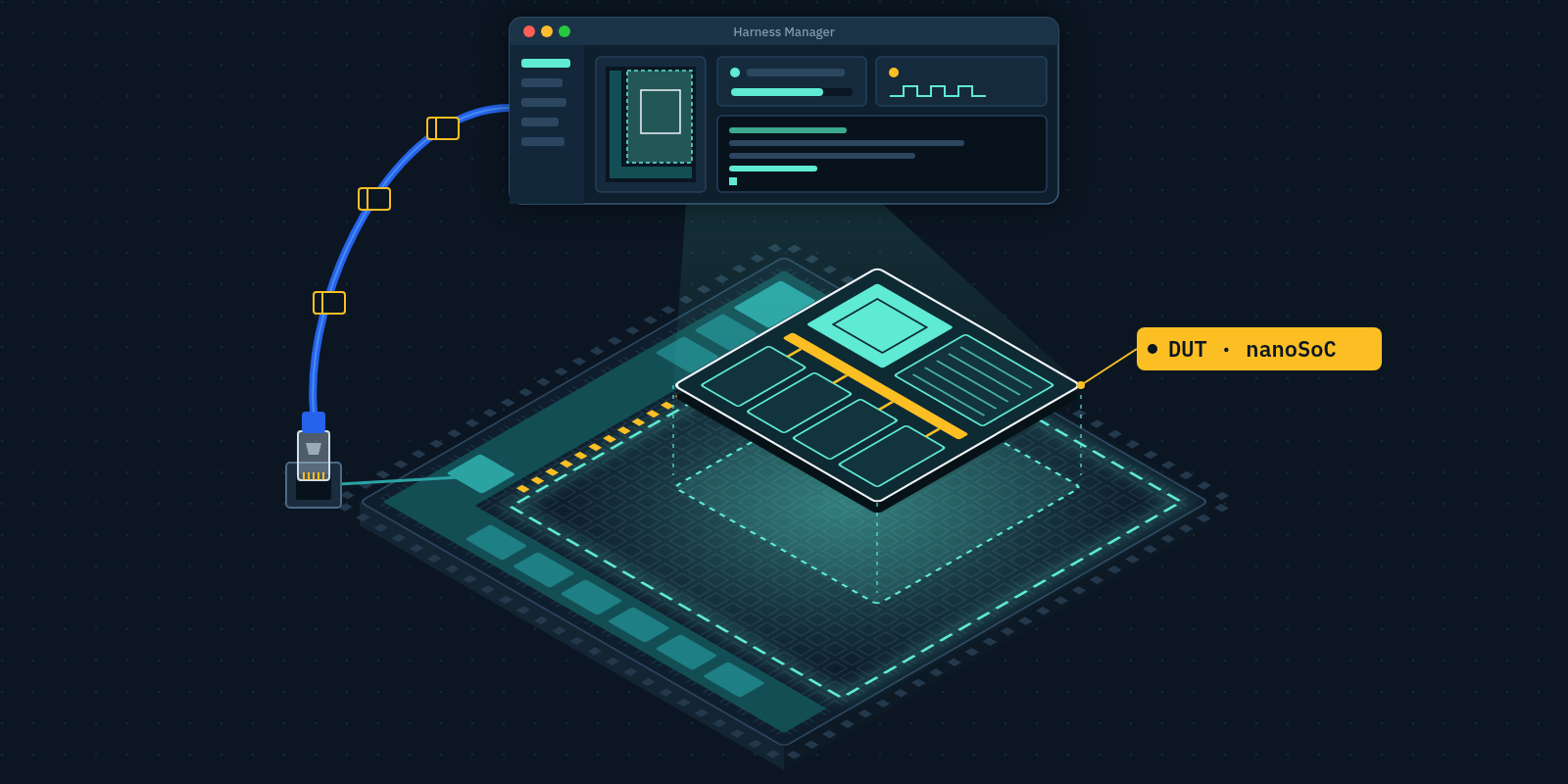
nanoSoC Hardware Prototyping Platform
The nanoSoC Hardware Prototyping Platform turns an off-the-shelf FPGA board into an efficient environment for verification of a System on Chip design. The Platform and Harness Manager are open on GitHub, with Getting Started, User Guide and Technical Reference documents for each release. For those just interested in using the Platfrom see Getting Started at the end.
For those interested in how it works and potentially getting involved in development, work is ongoing and the project description below gives information on the current state of the work as well as outlines work that is needed to improve the Platform. It also outlines some of the lessons learned during the AI assisted development which the community will hopefully find interesting and inspirational.
Setting the Scene
nanoSoC is envisioned as our gateway to System-On-Chip development and a good entry point for new designers coming from an electronics or non-hardware background. nanoSoC provides the fundamental components needed to build any SoC - a CPU core, memory, a bus framework, simple peripherals and off-chip debug capabilities. Progressing to larger SoC projects builds upon these core parts with extra functionality and performance but the key foundations to SoC design are all found in the nanoSoC reference design.
While this project discusses an efficient prototyping environment using FPGA boards it should be remembered that nanoSoC has been designed as an ASIC capable SoC design, the intent is that FPGA prototyping is a stepping stone to a implementing a fully working ASIC and there are important design considerations based on this approach.
We have built the nanoSoC reference SoC design along with the tool flows for simulation, linting, synthesis and implementation for a variety of different commercial and open-source tools in order to give people an easy to adopt on-ramp to EDA development. The driver for this nanoSoC Hardware Prototyping Platform came in developing the latest iteration of nanoSoC. We felt it was important is to increase the speed with which potential adopters could get a working prototype nanoSoC system instantiated in FPGA hardware. This supports both agile hardware development and our need to scale up SoC design training. The aim was that within a few hours someone wanting to use nanoSoC can see and exercise a modification based on their own SoC design ideas and experience an immediate impact.
Commercial design platforms, such as the Synopsys HAPS hardware prototyping system, aim to achieve similar goals. Such solutions provide a user-friendly UI and streamlined tooling so users are less concerned about having to optimise their design to the hardware prototyping platform and more emphasis of the core specifics of their design allow a speed up of implementation by reducing the design iteration loop time. They allows engineers to easily implement their design on FPGA without needing to understand the nature and detailed nuances of specific FPGA tools and the development platforms. They provide support for on-hand debugging without the need for designers to explicitly built such support into a test harness around their design.
The nanoSoC Hardware Prototyping Platform is designed to achieve such goals on a readily available FPGA development boards. The platform uses the baseline FPGA as a blank slate. A pre-built, fully-flexible and programmable socket harness is loaded within the programmable logic as the default image. In conjunction with the reconfigurable partitions afforded by the AMD UltraScale FPGA parts it enables specific portions of the FPGA programmable fabric to be reloaded on the fly without needing to reconfigure the entire FPGA. Not only does this speed things up, but it allows us to develop a management system within the harness that can be responsible for loading and reconfiguring this partition which we call the DUT partition thereby simplifying the SoC design bring up.
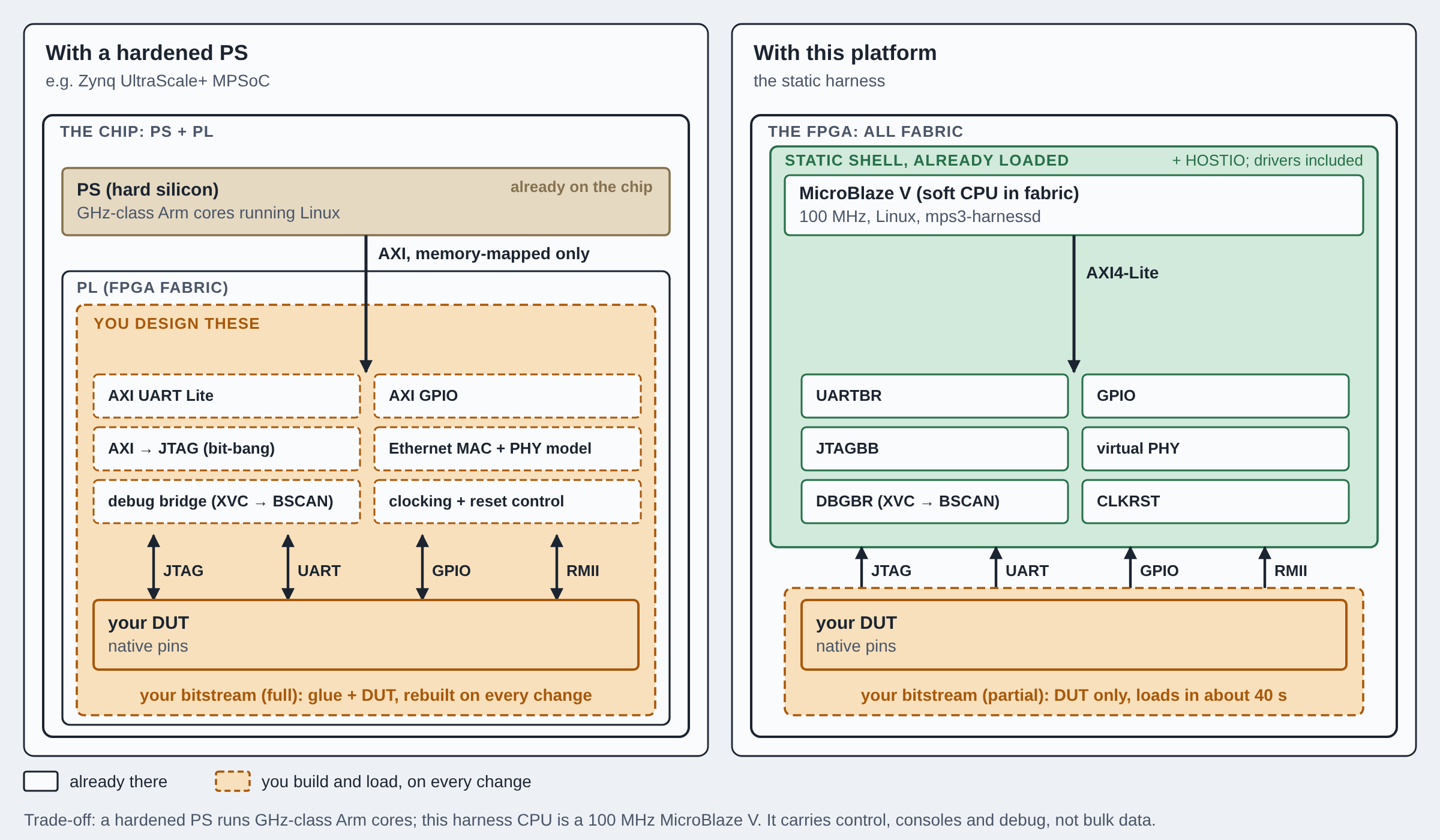
Along with this, other components, especially ones that work in tandem with nanoSoC designs, such as the SoC Labs hostio debug IP, can be placed in the preloaded static shell within the FPGA to create known good interfaces into the DUT partition. This is imperative as the nanoSoC SoC designs are designed inherently to be directly transferable from an FPGA verification environment to a full ASIC implementation where the silicon is tested via such external interfaces. The DUT needs to present the same external interfaces such they can also be verified. This reduces the need for external adapters and debuggers. The DUT signals are routed into the internal MicroBlaze V-based static harness management system through its own AXI-based interconnect. This CPU having prewritten and preconfigured drivers, should provide a seamless bring-up process for any new DUT dropped into the DUT partition. This is a major benefit over FPGA environments with hardened Processing Systems (PS) such as the Zynq UltraScale+ FPGAs as although they have a hardened, fast running Linux-capable CPU SoC built into the FPGA, the interface within the FPGA is memory mapped AXI and requires a soft harness to be built around the design to add components such as AXI to UART IP blocks within the synthesised bitstream to allow the PS to connect to the UART pins of the DUT.
The platform makes use of the built-on Ethernet LAN9220 which is given to the management harness as the primary way of interacting with the FPGA. A Linux OS running on the MicroBlaze V CPU runs multiple applications - one such example being the Xilinx Virtual Cable (XVC) protocol that provide access to Integrated Logic Analyzers (ILA, an on-chip debugging IP core) that can be implemented within the DUT to enable monitoring from Vivado. With this networking stack running on the CPU, and a number of applications running and ports exposed, a companion application, the Harness Manager, runs on host machines (Linux, Windows and macOS) to enable easy interaction with the harness, status monitoring, debugging, reconfiguring, updating and more, creating a much more user-friendly environment for designers.
The Core Architecture
The nanoSoC Hardware Prototyping platform has targeted the Arm MPS3 development board as the initial reference board. The expectation is large portions of the design will be portable to other FPGA development boards once a solid foundation has been constructed.
The Arm MPS3 development board (we are now using revision C but may support previous versions in the future) is build around an AMD Kintex UltraScale XCKU115; a 2 die (SLR) package built on a passive interposer. We try and keep as much of the harness in one SLR and the DUT in the other to prevent internal DUT timing paths crossing the interposer. This packaged device provides 663k LUTs to use for the harness and the DUT.
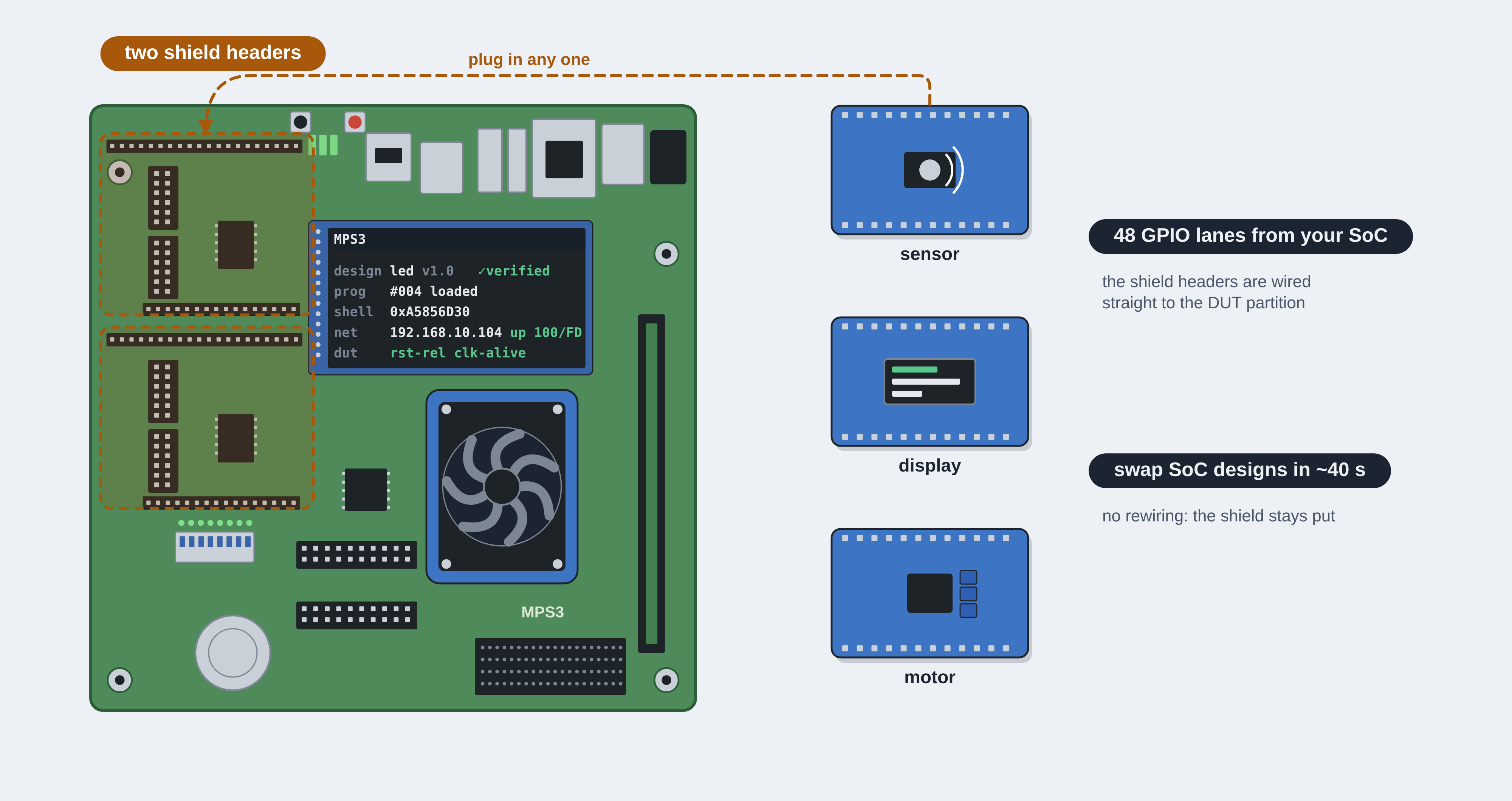
The MPS3 appeared a sound choice for two reasons. Around the FPGA fabric it carries most things an SoC designer wants to exercise: a 10/100 Ethernet controller, a 4 GB DDR4 memory module, QSPI flash, a microSD card slot, a 320×240 touchscreen LCD, Arduino-style shield headers and Pmod connectors, and a board controller that loads the FPGA at power-on. The XCKU115 supports AMD's Dynamic Function eXchange (DFX), the ability for partial reconfiguration that the rest of the platform is built on.
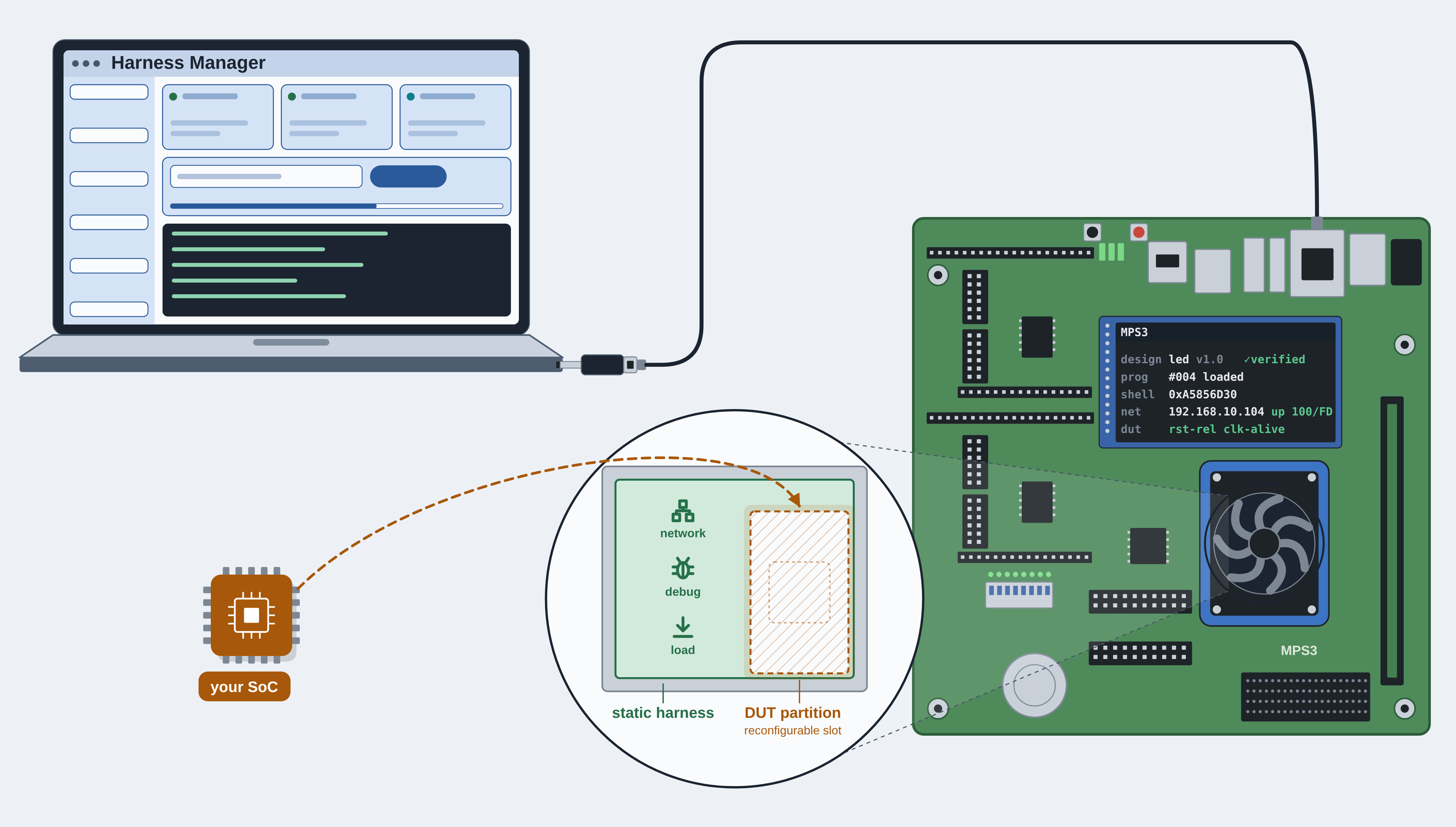
The FPGA development board is one of two physical components of the Hardware Prototyping Platform, the other being the Host PC responsible for driving and interacting with the FPGA. The Host PC runs the Harness Manager application. As stated previously, the FPGA is segmented into two regions, a static harness and the reconfigurable DUT. The static harness occupies a fixed region of the FPGA, the static shell. It manages the board and acts as the DUT's testbench: it loads the design, bridges the DUT's debug and I/O to the networks, and keeps the board reachable under periods when the DUT partition is under reconfiguration. The host is connected to the FPGA development board over a single cable, an Ethernet link used for harness control, DUT interaction and DUT debug. There are no USB probes, no JTAG programming cables or additional cables required. This is a minimal setup with the aim to work out of the box without additional hardware. Below is a high-level view of the interactions between the Host PC and the FPGA development board.
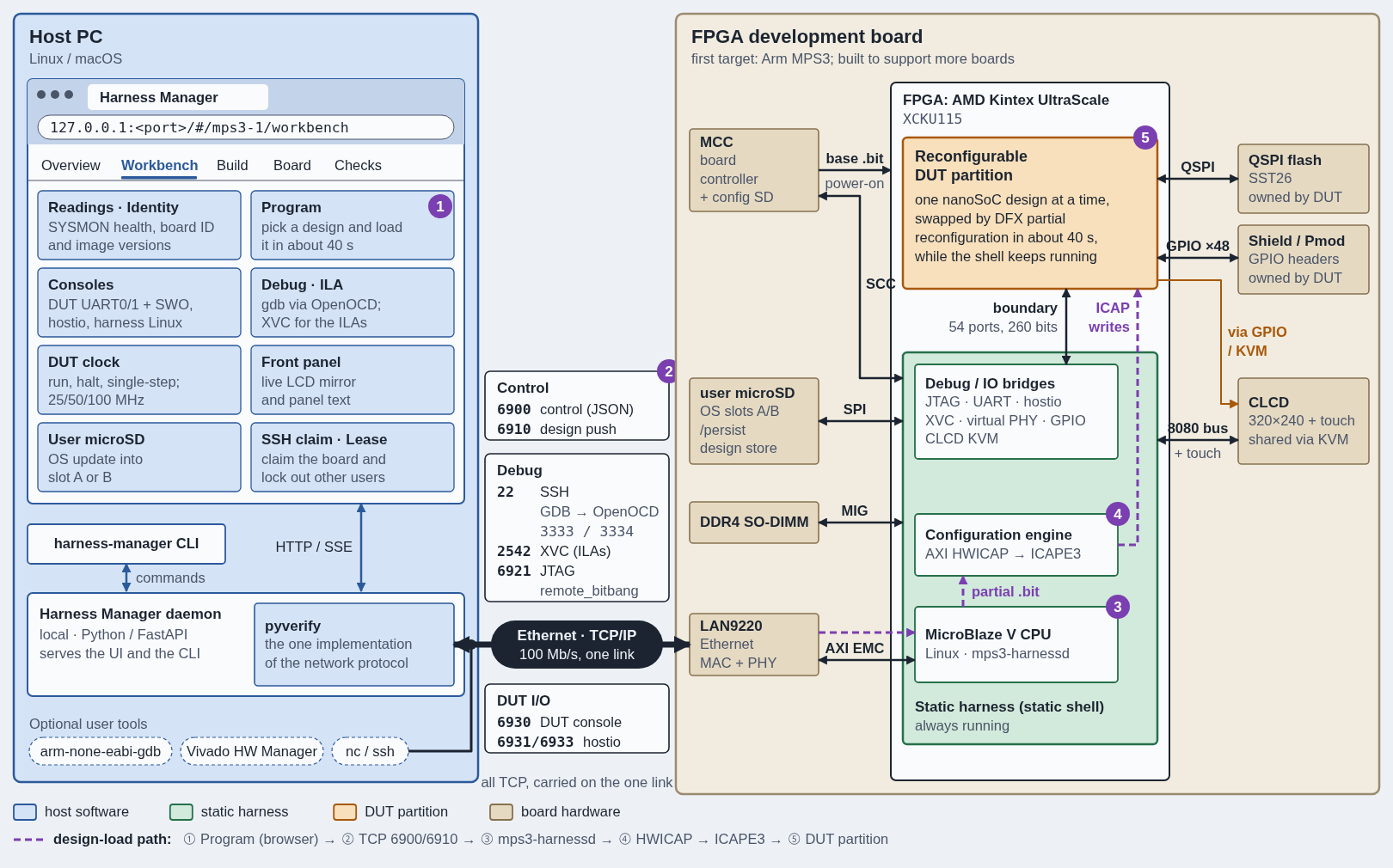
The Ethernet link between the Host PC supports a variety of different protocols. The FPGA harness exposes a number of different TCP ports that are responsible for carrying the variety of different capabilities. The table below shows the ports in detail as they are currently implemented:
| Group | What it carries | Ports |
|---|---|---|
| Control | JSON commands; design pushes | 6900; 6910 |
| Debug | SSH (GDB tunnel to OpenOCD on the board) | 22 |
| XVC for ILAs | 2542 | |
| JTAG fallback | 6921 | |
| DUT I/O | console | 6930 |
| hostio | 6931 / 6933 |
One of the main advantages to structuring the interactions in this way is we can make use of the existing network stacks for protocols such as XVC allowing board to be physically remote and to have potentially multiple boards in a farm behind network switches. The boards act the same whether they are next to you on your desk or in a completely different location.
The static harness is constructed out of 4 main subsystems. The CPU subsystem is the brains of the harness - it is responsible for the coordination of all the peripherals and other subsystems within the harness and runs a custom Buildroot Linux kernel. In order to do this, the MicroBlaze V needs access to DDR memory, fortunately, the MPS3 board has a SODIMM socket to support pluggable DDR4 modules. As outlined above, there are a number of services and applications that are running on top of Linux to enable the communication with the Host PC.
The Board I/O subsystem is the I/O on the board that the harness owns. This includes the LAN9220 Ethernet, the User MicroSD Card reader, the board controller MCC which is connected back to the harness with a USB loopback, as well as temperature and voltage sensing.
The third subsystem is the partition control, responsible for reloading the reconfigurable DUT partitions. The harness rewrites the partition through ICAPE3, the FPGA's internal configuration port, the same engine an external JTAG cable would drive, but reachable from inside the chip. The MicroBlaze V feeds it through AMD's AXI HWICAP core, which turns the port into a register interface with a write FIFO. The CPU streams the new partial bitstream into that FIFO as it arrives over Ethernet, and only the partition's region of configuration memory is rewritten.
While this happens, the DFX decoupler protects the rest of the harness. It doesn't take part in the configuration at all. It is a set of switches on every signal leaving the partition, which hold those signals at safe values while the partition's logic is being replaced. Once the new design is in place, the switches close and the DUT's signals pass through again. This third subsystem is also responsible for handling the DUT clock and reset controller. The DUT's clock comes from an MMCM in the static harness. It multiplies the board's 50 MHz oscillator up to 1 GHz and divides it back down to 25, 50 or 100 MHz. The harness can retune it over AXI without reloading the design. Between the MMCM and the partition sits a BUFGCE, a global clock buffer with an enable input, which lets the harness halt the DUT on a clean clock edge, step it by an exact number of cycles, and count every cycle the DUT has seen. This is a feature that future functionality within the harness development will be able to take advantage of for more sophisticated debug techniques. The DUT's three resets (core, partition and debug) assert immediately and release in step with the DUT clock, so the design always leaves reset cleanly.
The final subsystem is the DUT-facing bridges. The diagram below shows these clearly, notably the JTAG, BSCAN, Ethernet virtual PHY, QSPI Flash, UART and GPIO but also the LCD KVM which allow the harness to drive the onboard LCD display the majority of the time. It also allows SoCs and applications that have LCD drivers to use it for displaying DUT applications.
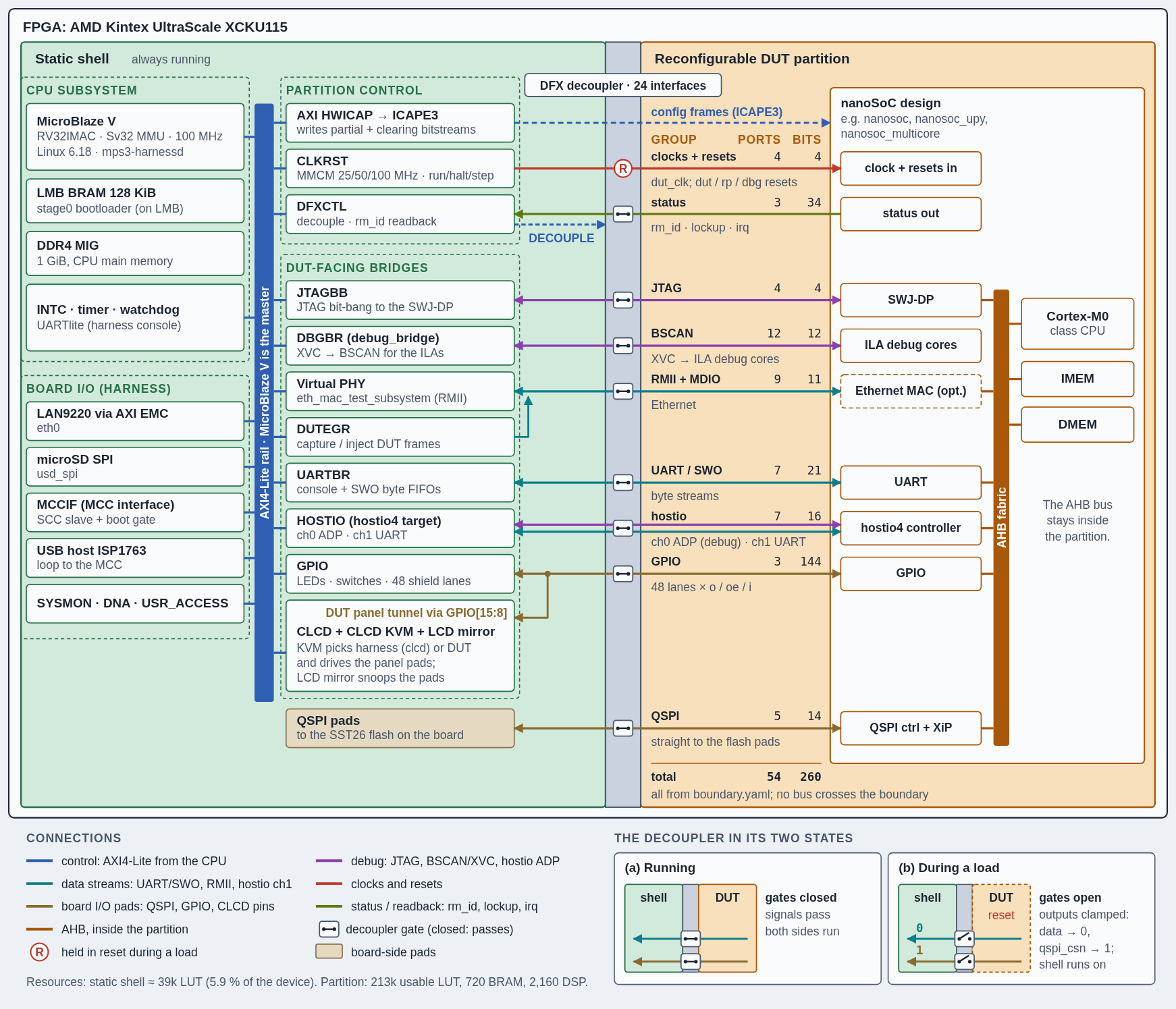
On the MPS3 board, the harness uses approximately 6% of the FPGAs LUTs (39k). We then allocate around 213k LUTs, 720 BRAMs and 2160 DSPs to the DUT partition. So far we haven't built a nanoSoC instance that fully utilises these resources so hopefully the MPS3 is well suited to nanoSoC deployment. Our baseline m0 nanoSoC uses 5% and our dual-core Ethernet nanoSoC system consumes 14%. We leave 62% of the FPGA unused which gives the DUT partition room to grow in the future.
The boundary
Every signal must cross the defined, fixed border between the DUT partition and the harness. Currently, this has 54 ports in 9 groups. This is broken down as follows:
| Group | Ports | Bits | What it carries |
|---|---|---|---|
| Clocks and resets | 4 | 4 | DUT clock; core, partition and debug resets |
| JTAG | 4 | 4 | Debug access to the SoC's SWJ-DP |
| ILA debug (BSCAN) | 12 | 12 | Vivado ILA access over XVC |
| Ethernet RMII | 9 | 11 | DUT MAC to the virtual PHY, plus MDIO |
| UART streams | 7 | 21 | Console and SWO as byte streams |
| Status | 3 | 34 | Design ID (rm_id), lockup, interrupt |
| GPIO | 3 | 144 | 48 lanes × output, output-enable, input |
| QSPI | 5 | 14 | Flash interface, passed through to the board's flash |
| hostio | 7 | 16 | hostio4 link: ADP debug and a second UART |
| Total | 54 | 260 |
The boundary is generated from a defined yaml file which allows the RTL, constraints and checks to remain aligned through development and implementation. As can be seen, no bus crosses the boundary - there is no direct way to more memory mapped transactions between the two regions without riding a separate debug or interface protocol such as SoC Labs hostio. This ensures the design in FPGA looks and acts like the SoC on the final ASIC silicon.
The same principle applies to how a design starts. nanoSoC boots from QSPI flash exactly as the chip will: it's boot code copies the time-critical program into on-chip memory, checks it, and runs the rest in place from flash. The FPGA therefore exercises the real boot path rather than a convenience shortcut, and a design that boots on the platform has already proved the start-up sequence it will use in silicon.
Additionally, a decoupler is inserted that acts as a membrane between the two partitions; this holds safe values while a new design loads.
A typical nanoSoC design loads in about 40 seconds and the empty greybox design in about 30. Almost all of that time is spent receiving the partial bitstream over Ethernet and writing it into the configuration port. The current limit is the soft CPU rather than the FPGA itself. Faster loads are on the roadmap, by staging bitstreams in the board's DDR4 and moving the transfer from the CPU to DMA, but even today a new design is running on the board in under a minute, with no cables touched and the harness never going offline.
Partial Reconfiguration in Practice
The usual way of running a bitstream is to reconfigure the entire FPGA. On the MPS3 development, this has to be done by copying the bitstream to the MicroSD card and reloading the entire board which can be tedious and time consuming unless you want to reload over JTAG which has the effect of having non-permanence on reboot. Partial reconfiguration solves this by only rewriting the partition, over the network, while the harness keeps running. The harness, CPU, network and debug bridges stay up during reconfiguration and the partial bitstream is transported to the harness over Ethernet - this is how the iteration speed is improved compared to the default use case for the board.
There are other advantages; the build times are reduced compared to building the entire harness and DUT in one bitstream, the complexity of wiring and block diagram integration is reduced and SoC Labs provides a proven harness you can trust. This means you are less likely to introduce bugs within the harness as it has already been built and is running on the FPGA and faults with the harness are immediately obvious upon initial FPGA boot. This reduces the debug time trying to triage whether the bug lies in the harness, interface or the DUT. The harness is soak tested, exercised by a variety of different harnesses and ran on multiple boards. The routing and placement is locked, DUT changes will not interfere and break timing closure within the harness.
Harnesses are produced in a phase called minting. This is where a fixed harness is released, the placement and routing are locked and is then distributed with a given static_id. A partial bitstream only works with the exact harness it was built against, so every new mint means rebuilding every DUT design.
The build process is shown as a 5 step procedure within the Harness Manager GUI. The first step is Setup - you pick the board and it's static_id, find the matching version of Vivado that the harness was implemented with and fetch the build kit. The kit is the locked harness plus its constraints, checked against the static_id.
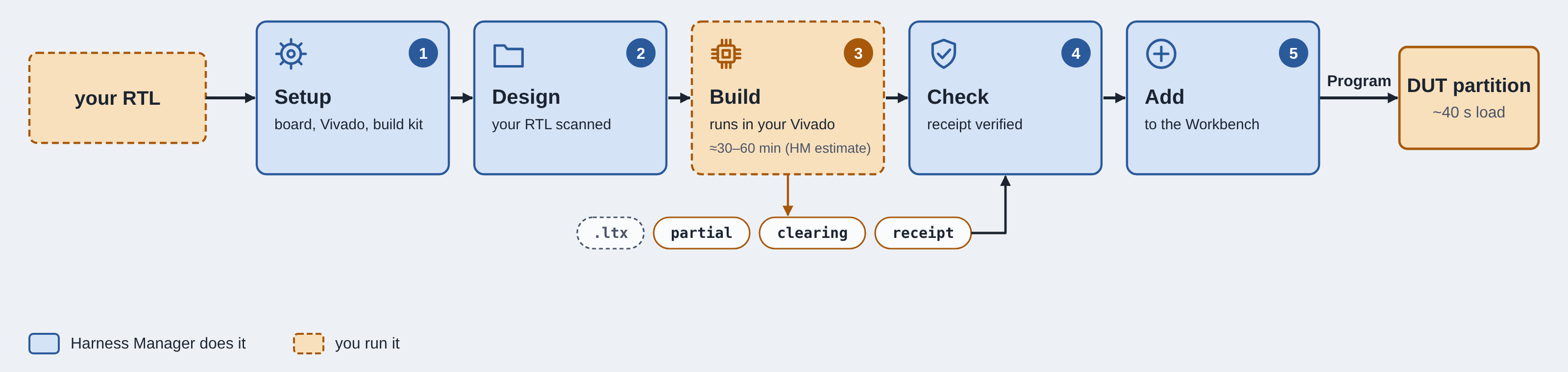
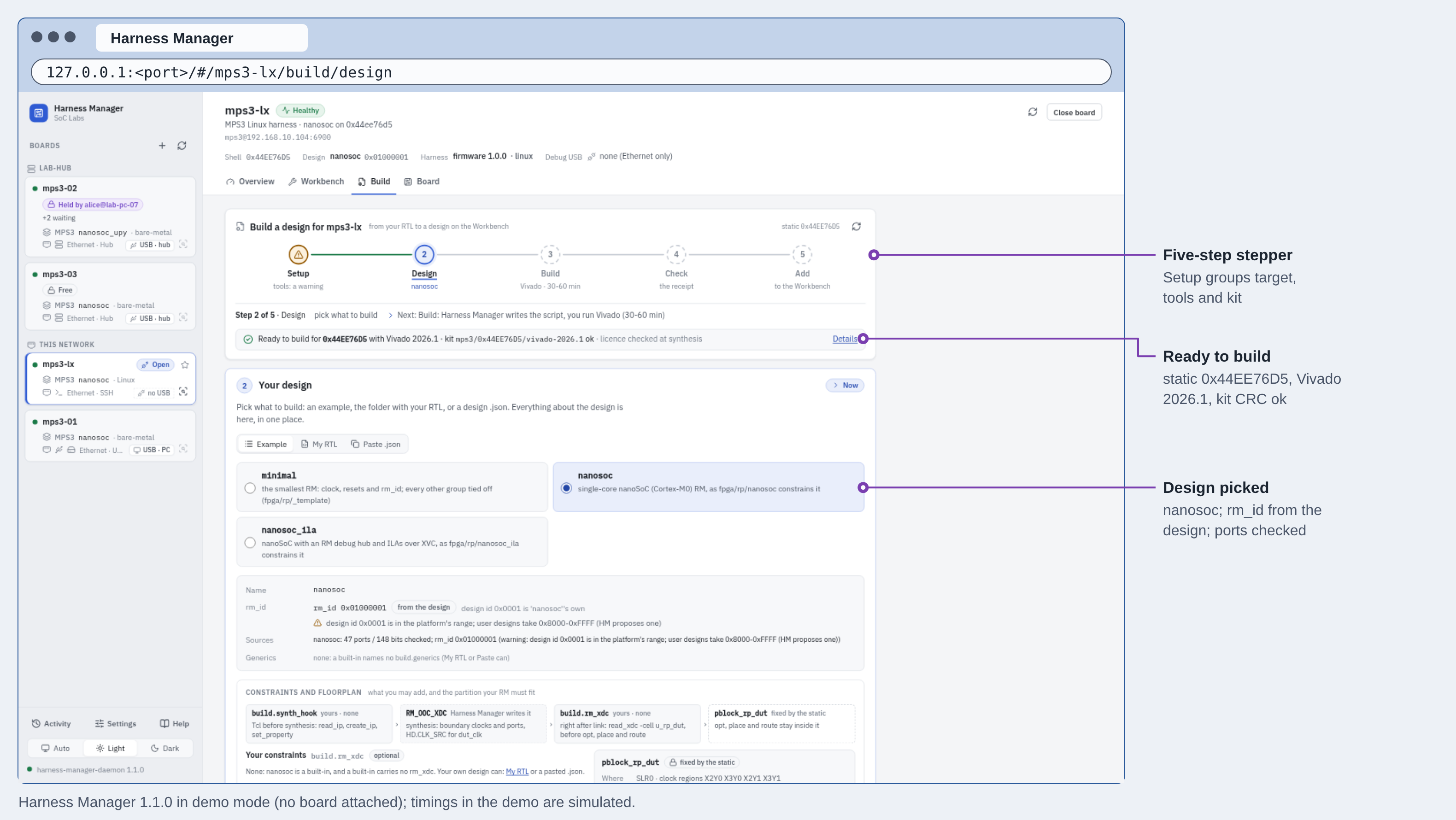
The second step is Design, you choose what to build: one of the built-in examples, a folder or .f file list of your own RTL, or a design description in JSON. Harness Manager scans your RTL without running a simulator or Vivado. It proposes:
- the sources in compile order;
- the top module;
- the include directories;
- the top-level parameters, including any memory image a $readmemh loads;
- which of the boundary's interface groups your top module uses.
From the same description it generates a wrapper skeleton, which connects your design's ports to the partition boundary, and the out-of-context constraints for the partition. The partition's own region on the FPGA is fixed by the harness. You can add placement constraints inside it, but you can't move or enlarge it.
The build step is where Harness Manager generates a .tcl script which is then passed to Vivado, along with the kit and the constraints. A command is then given to you to run in Vivado as the tool does not directly call Vivado itself. It writes four outputs: the partial bitstream that loads your design, the clearing bitstream that will later remove it, the ILA probe file (.ltx) for debugging, and a build receipt. The receipt is a small JSON record of what was built: the static_id it was built against (worked out from the checkpoint it actually opened), the rm_id your netlist drives, and the length and CRC of each output file. You can stop the build at any stage, for example after linking, to add your own placement constraints, then carry on.
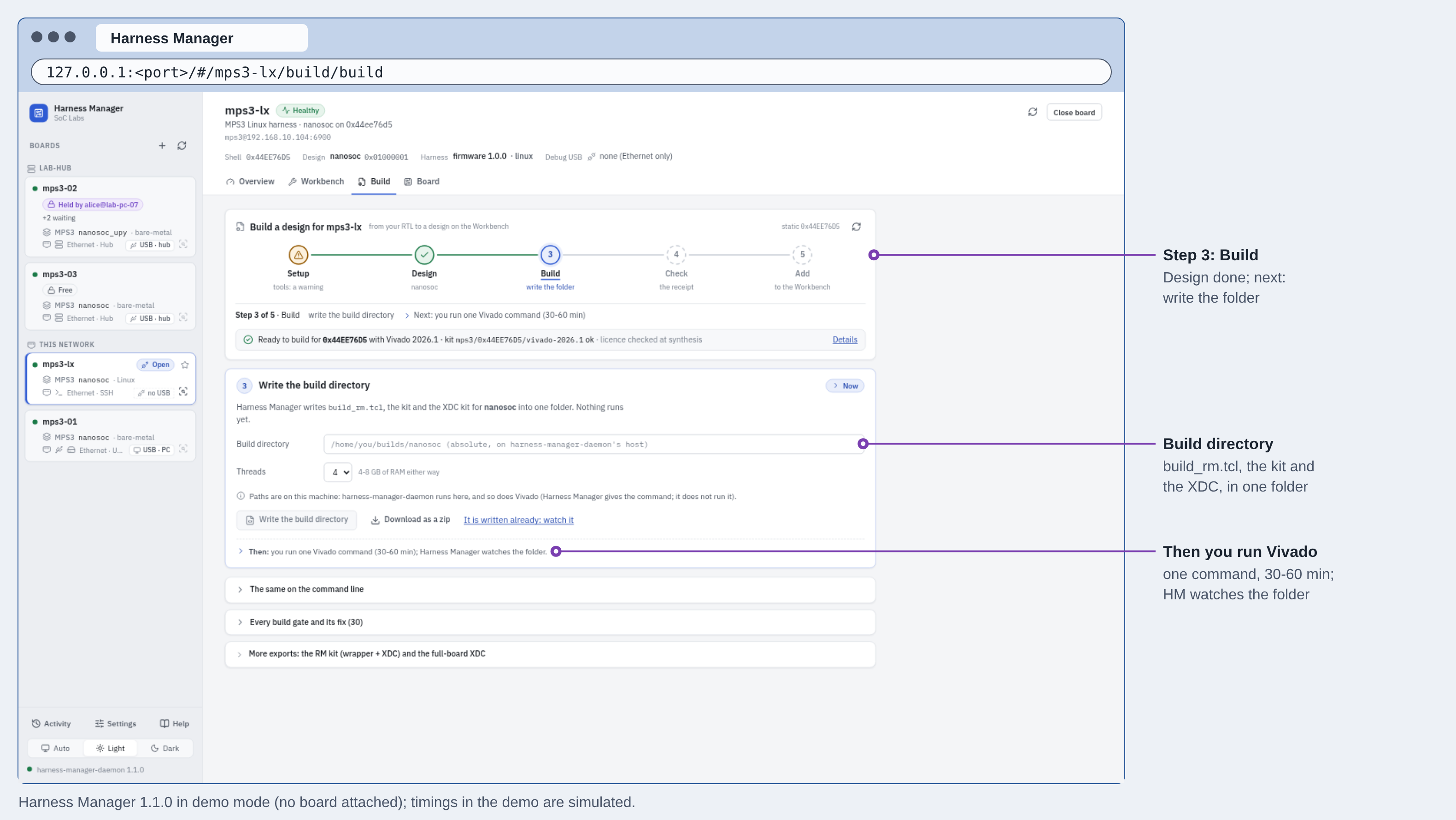
The check step performs some simple checks to ensure that the build is valid against options and parameters the generated tcl provided. In Add, Harness Manager packs the partial, the clearing bitstream and a manifest into a design package. The manifest is generated from the receipt, so nobody writes one by hand. The package goes into your catalogue and appears in the Program list on the Workbench, ready to load into the partition.
Within the FPGA there is an configuration port, usually controlled from an external JTAG called ICAPE3, which is accessible from the FPGA fabric itself. It takes a bitstream in 32-bit chunks and writes it it into the FPGAs configuration memory which define every LUT, route and BRAM within the fabric. The AMD IP core that enables this interaction is the AXI HWICAP, it allows the CPU to drive the ICAPE3 from the AXI memory map bus from within the harness. The MicroBlaze V CPU runs a service called mps3-harnessd which streams the partial bitstream directly from the network into the FIFO in 16 KiB chunks, it is not buffered in DRAM so is currently a bottleneck in the reconfiguration process.
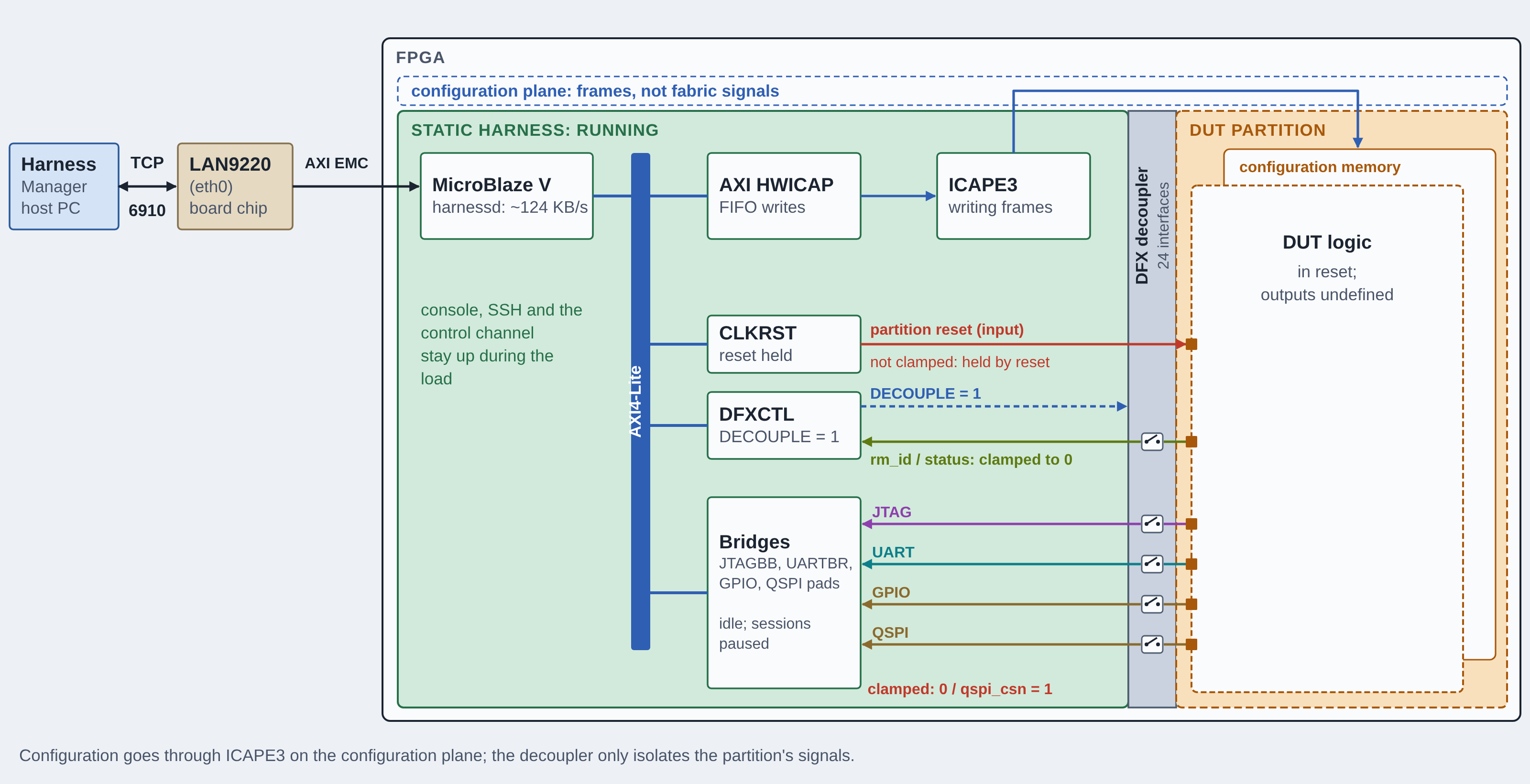
During reconfiguration, the DFX decoupler is responsible for holding each signal between the harness and the DUT at a safe value this is important to prevent:
- stray bytes on the console;
- the flash chip-select going low mid-load;
- a runaway Ethernet frame into the virtual PHY;
- a false design ID.
The DUT partition is held under reset during reconfiguration to prevent unexpected, but safe data, entering the DUT.
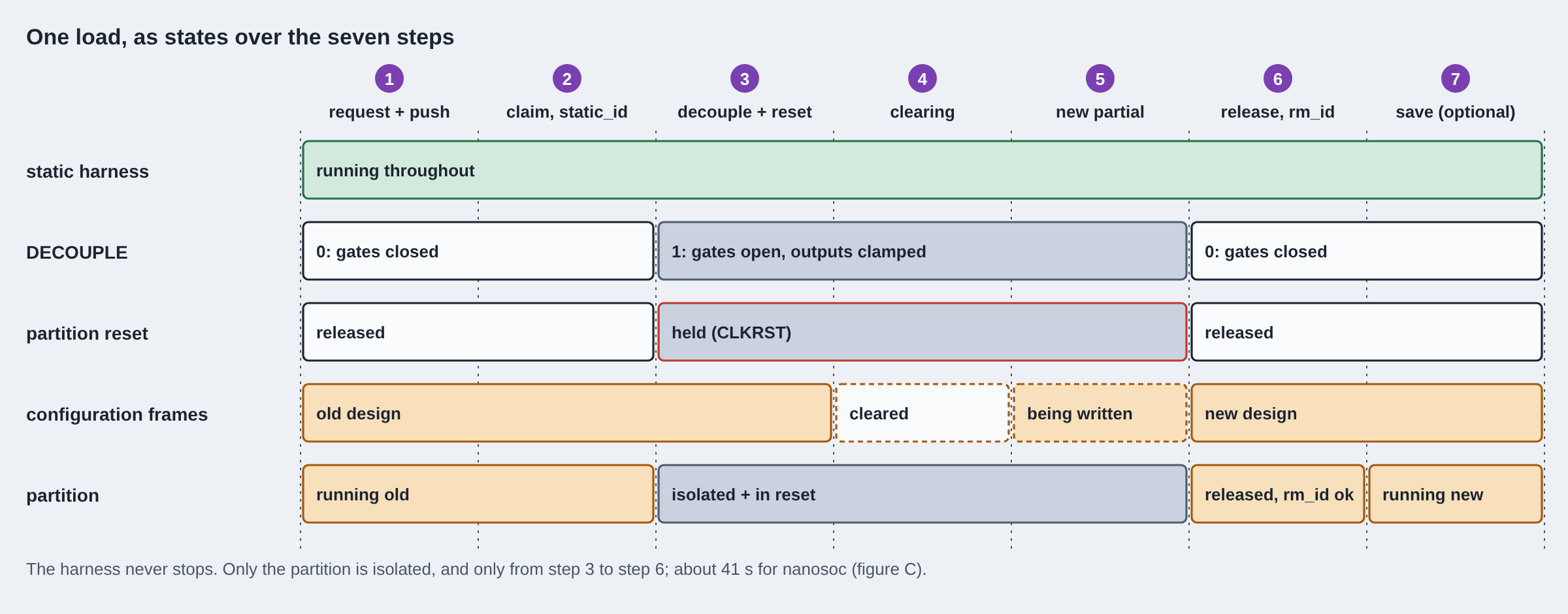
A load takes seven steps:
- Request: Harness Manager asks for the load and sends the design over Ethernet.
- Check: the harness confirms the board is yours and the design was built for this harness.
- Isolate: the decoupler is raised and the partition is held in reset.
- Clear: the outgoing design is removed, which UltraScale devices require before a new one is written.
- Write: the new design is streamed into the configuration port. This is where nearly all of the ~40 seconds goes.
- Verify: the decoupler is lowered, and the harness reads back the design's ID to confirm it is the one you sent.
- Keep: optionally, the design is saved to the microSD card so it loads again at power-on.
If any step fails, the partition is left isolated and in reset rather than half-loaded, and loading the empty greybox design brings it back.
Debugging without adapters
The nanoSoC Hardware Prototyping Platform has been designed as a prototyping environment where debugging is a large focus of the functionality. In an environment with multiple boards, lots of USB adapters and USB hubs connected can make this very problematic which was why one of the initial goals of this platform was to embed the debuggers within the FPGA static harness. The drivers and adapters are already built, no compatibility issues and each debugger can be exposed over the network. It also becomes very easy to have hierarchy and make it obvious which debugger belongs to which development board where you do not need to manually associate debugger serial numbers with board names.
There are 4 debug paths; SoC firmware debug via JTAG (formerly using SWD but migrated to JTAG due to availability of AMD AXI to JTAG IPs) exposing an OpenOCD server, SoC Labs hostio, ILAs and console and clock control. All of this can be controlled and monitored over a network connection.
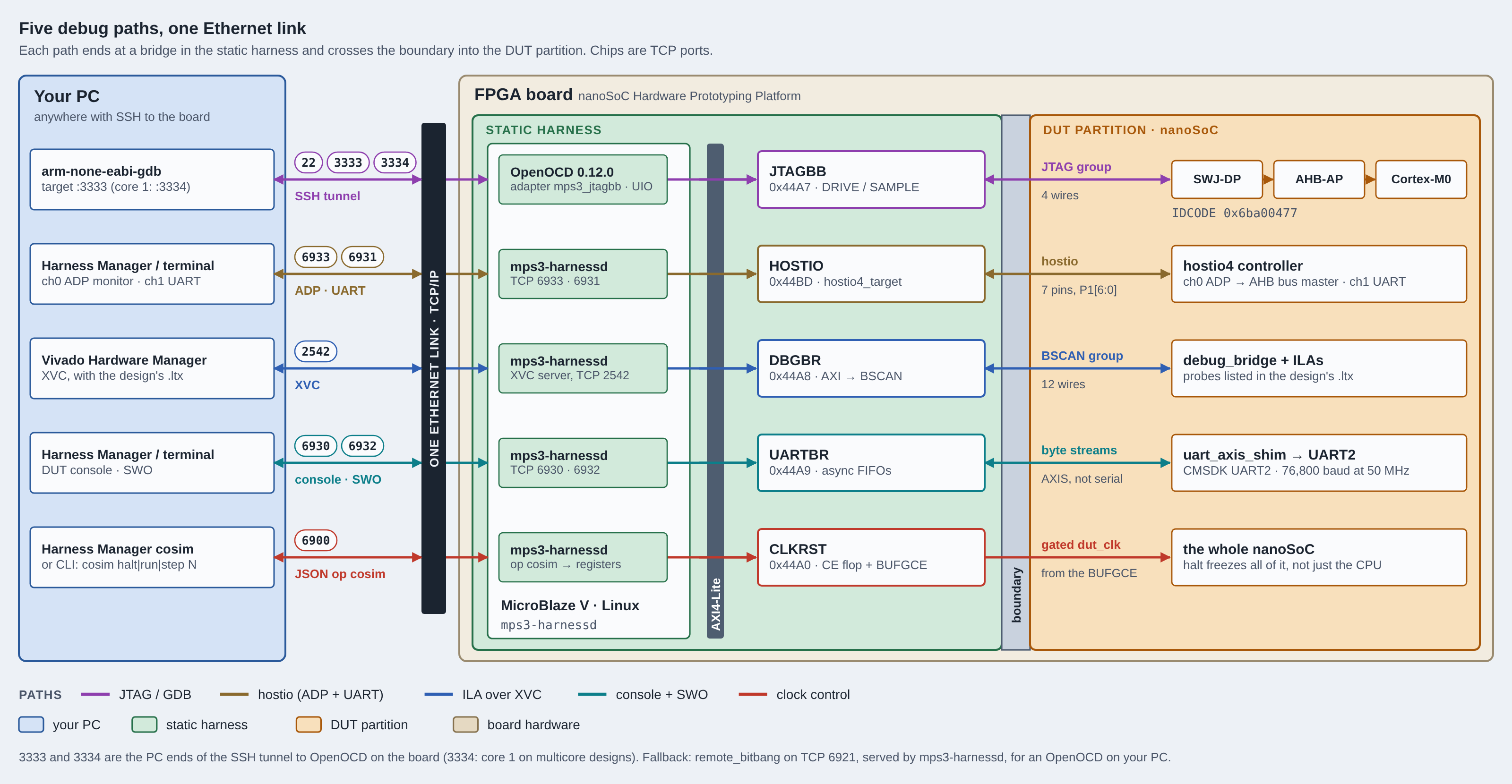
Firmware debug is important for SoCs like nanoSoC where we have a software/hardware co-development strategy where functionality may need to be implemented in software and thus needs to be debugged. This is why the JTAG and GDB debug are so important. The chain works as follows, a GDB session is running on your development PC, an SSH tunnel is then established into the harness running on the FPGA board and connects to the OpenOCD server that is running on Linux on the MicroBlaze V. The MicroBlaze V has access to a memory mapped JTAG bridge which is able to interface with the nanoSoCs firmware JTAG interface which the goes through the CoreSight debug port within the nanoSoC to the access port for the Cortex-M microprocessor. All that is needed on the host PC is GDB and Harness Manager and you are able to start debugging.
hostio is nanoSoC's own host interface. It is a small parallel link through which a host PC can talk to the chip, separate from the Arm CoreSight debug port. The hostio exposes 2 channels over the same set of pins, an ADP server over TCP on port 6933 and a second byte stream, the SoC's second UART on TCP 6931. The ADP, ASCII Debug Protocol is a small monitor within nanoSOC that acts as an AHB bus master and gives full memory mapped access to the AHB bus matrix within nanoSoC. It has a simple set of commands to read and write to addresses of varying lengths and because the commands are ASCII, a serial terminal or script is able to drive the interface without any specific debugger software required. It affords debug over the top of the CPU - if the CPU is broken, the hostio will give another point of entry into the system. SoC Labs also provide an OpenOCD adapter driver to allow OpenOCD to drive the SoC using a Memory Access Port (mem_ap) in software.
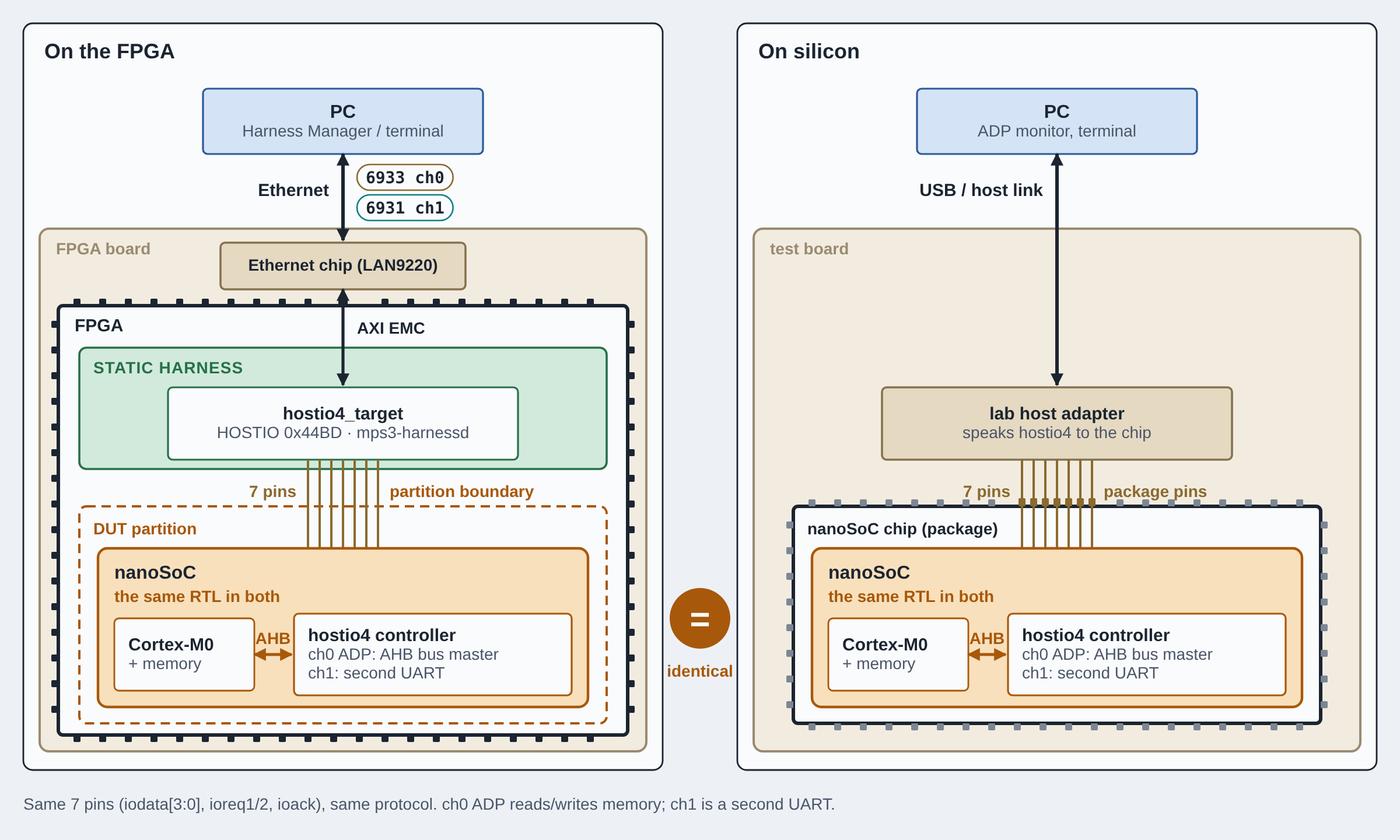
Internal Logic Analysers (ILAs) are AMD soft IP, made from fabric logic using the Configurable Logic Blocks (CLBs) within the FPGA which allows for debugging of signals within Vivado. These are wired into the JTAG scan-chain within the FPGA and it is important that this debug path is available to designers. The harness exposes an XVC port, TCP 2542, which can be attached to from Vivado to access the ILAs that have been built into the DUT designs by using the .ltx file that is paired with the DUT design. Harness Manager refreshes the connection after each partition reload and allows the designer to remotely connect to the ILAs. The DUTs console UART is also exposed over a TCP port 6930 that allows tool like socat to attach to this remote serial session.
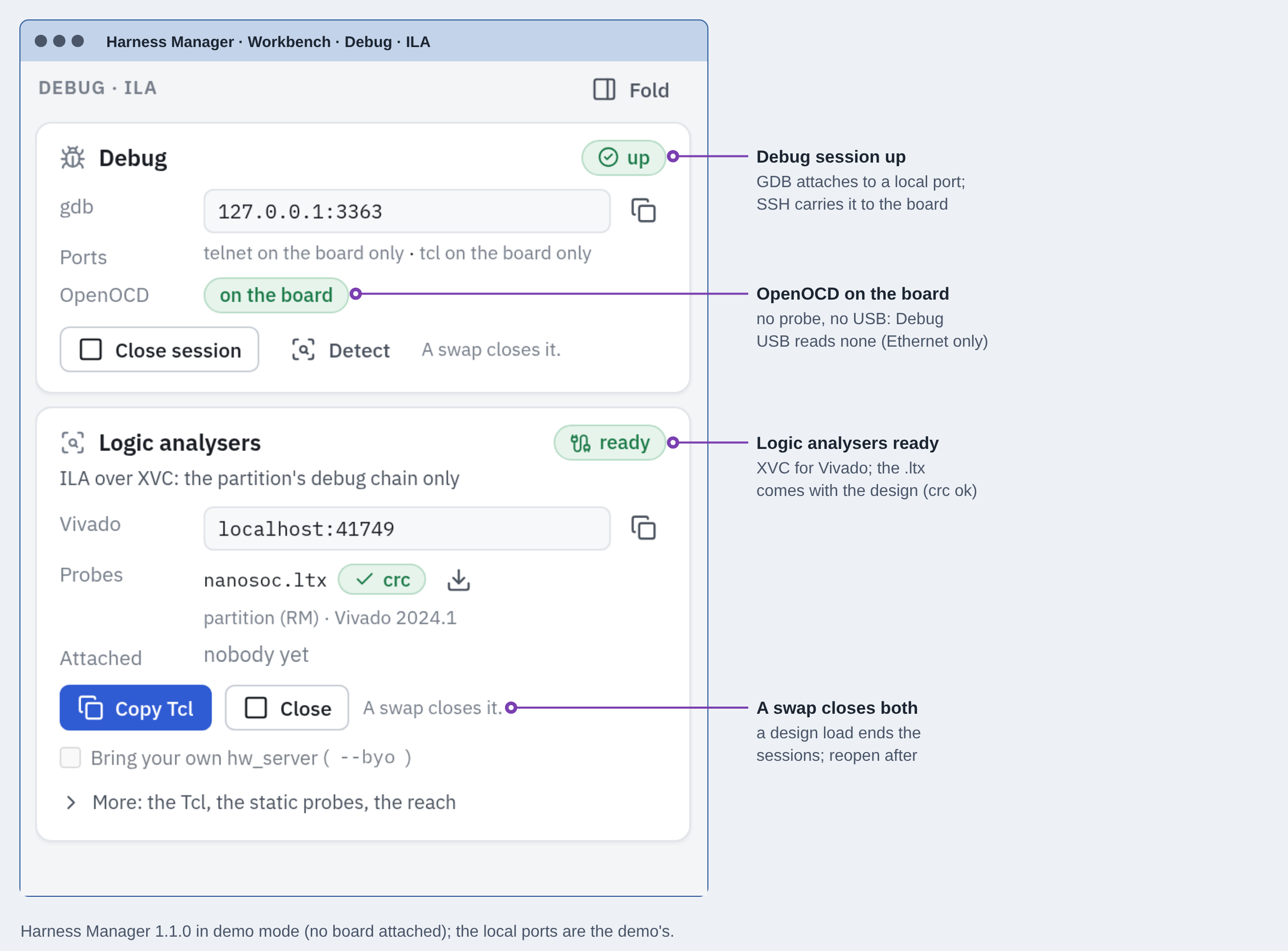
The harness can also stop the DUT's clock. A clock buffer between the clock generator and the partition lets Harness Manager halt the design on a clean edge, step it forward by an exact number of cycles, and count every cycle it has seen. Unlike a debugger halt, which stops only the CPU, this freezes the whole SoC at once, including buses, timers and peripherals, which makes runs repeatable and lays the groundwork for co-simulation against a software model.
Behind all of these paths sits the software: Linux on the board, and Harness Manager on your desk.
Embedded Linux on the board, Harness Manager on the desk
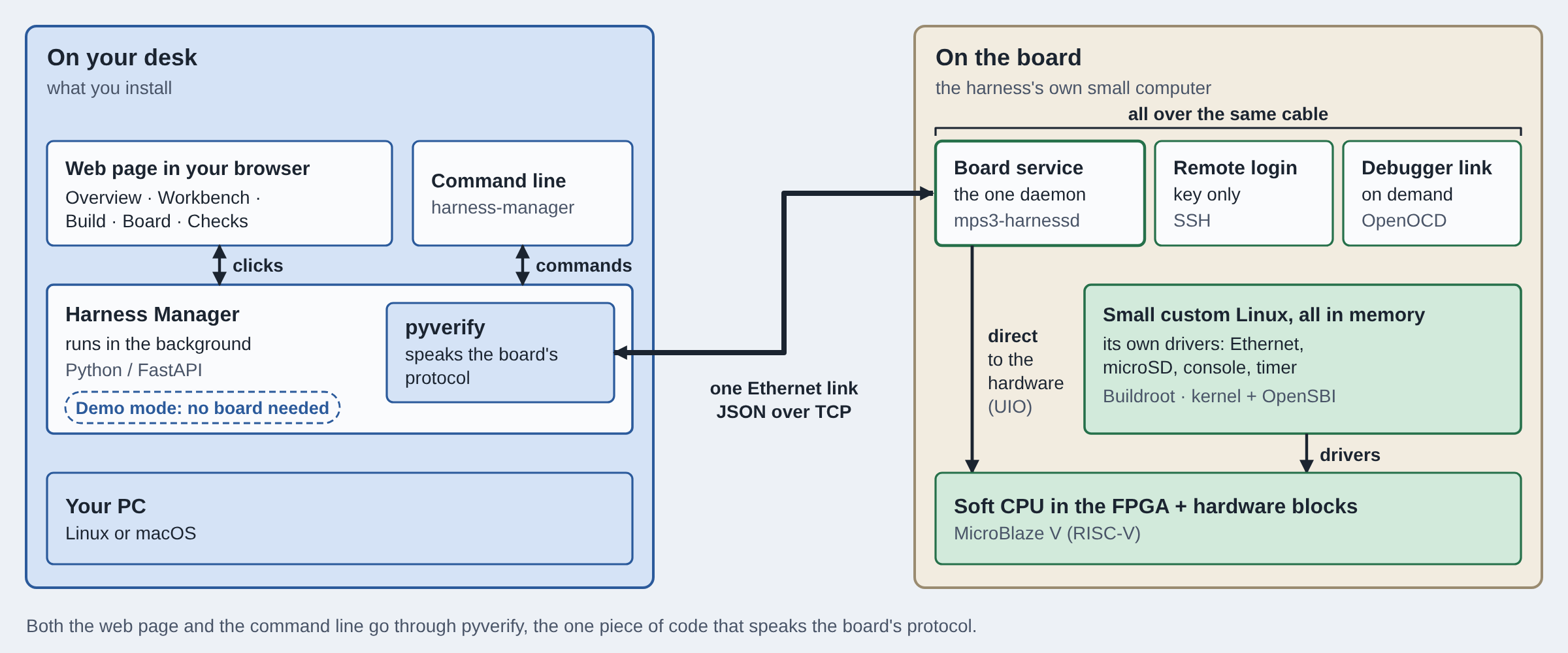
As mentioned previously, there are two software components to this project. An embedded portion, and then the software that is running on the host PC. The MicroBlaze V within the static harness in running a custom Linux distro which is responsible for running the network stack and a number of different services and applications mentioned in the prior sections. The host-side application is Harness Manager, a GUI application which allows direct control over one or multiple nanoSoC Hardware Prototyping Platform development boards over a network. The entire communication between these two pieces of software is a TCP protocol where lines of JSON are send between one another.
Embedded Linux
An initial bare-metal implementation of the firmware for the MicroBlaze was written but it suffered multiple limitations; there was no memory management, one polled loop and too much interaction could stall the network with no scheduler support. Linux afforded a higher-level of support, open-source drivers and applications, a supervised daemon and SSH. The board runs a custom Linux, built from a toolkit called Buildroot which only puts together the software components we need rather than a general-purpose Linux like Ubuntu which is a lot heavier. The whole system runs from the boards DDR when it starts, only settings are saved to the microSD card so a restart will always return to a clean, operational operating system. SSH enables secure communication over the network by using authentication keys, this allows a connection from anywhere on the network with no additional tools or software required. Linux's description of the hardware memory map is generated by our tools, along with the register maps used by the harness software and Harness Manager, straight from the Vivado design.
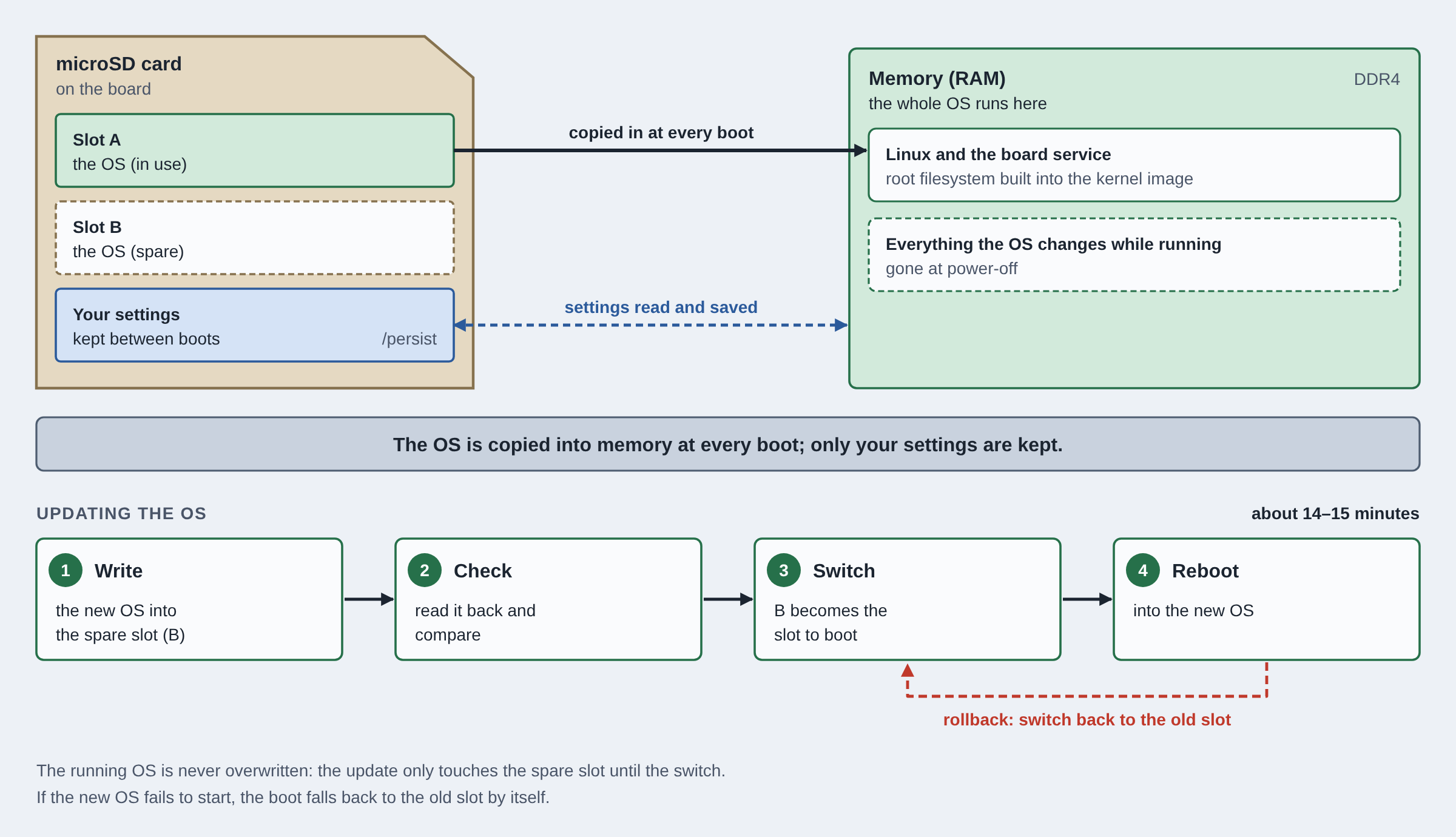
The boot process for the harness and Linux image goes as follows. First, the bitstream is loaded from the microSD card by the board controller (MCC). A stage0 bootloader runs from on-chip memory, contained within the bitstream, that configures the DDR4 and waits for it to calibrate. The microSD also contains two complete copies of the operating system in slots A and B. One is the default and the second is for new images. It acts as a backup for over-the-air OS updates and means that there is rollback and self recovery if a new Linux image fails to boot. It is at the stage the stage0 bootloader copies the OS from one of the two slots into DDR which is from where Linux will now run. Linux then starts up, brings up the network and launches the harness software that everything else talks to. A few minutes after power-on, the board is ready to use. To keep an unattended board from getting stuck, a hardware watchdog restarts it if the software ever stops responding, and the bootloader remembers failed starts.
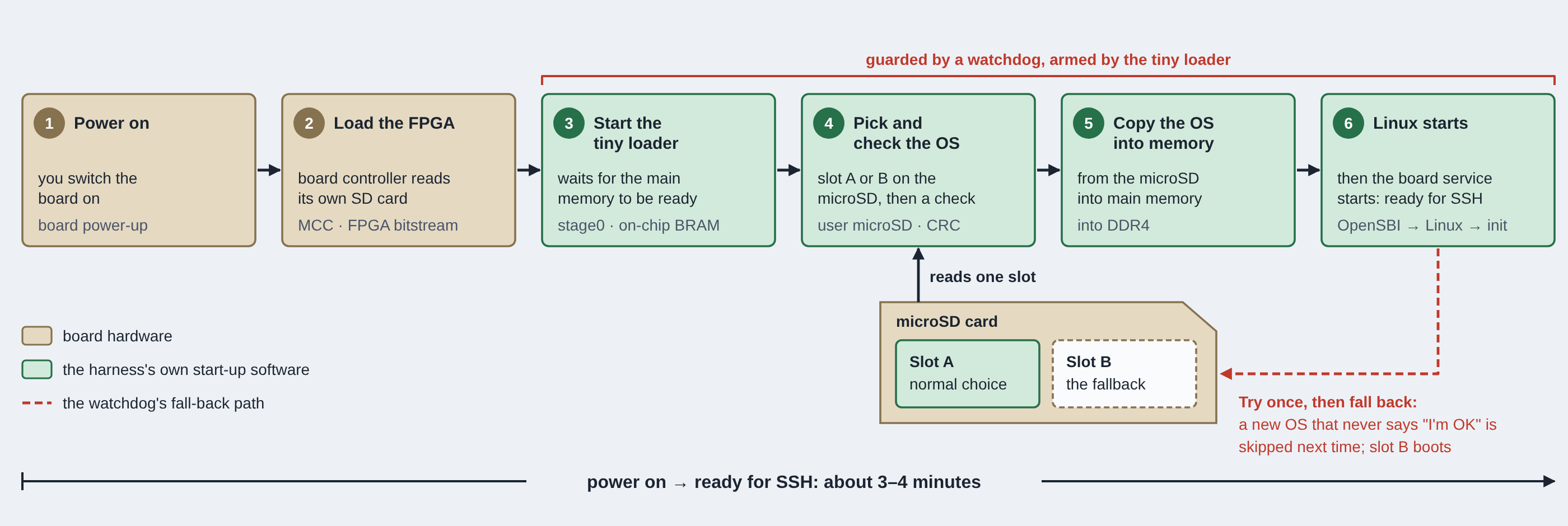
The stock 32-bit RISC-V kernel config builds 21 MB of modules what we weren't using such as GPU drivers, USB stack and virtulisation. With this we were able to shave a lot of space in memory and to improve the boot speed, we stored the rootfs uncompressed to remove the need to decompress during booting.
On the board, a single background program called the harness daemon acts as a switchboard: it receives every request from your PC, whether loading a design, opening a console or starting a debug session, carries it out on the hardware, and makes sure only the person who has claimed the board can make changes. This daemon is responsible for running:
| Service | Port | What it does |
|---|---|---|
| Control | 6900 | Load designs, reset, set the clock, read status |
| Design push | 6910 | Receives design files and OS updates |
| Console | 6930 | Your SoC's serial console |
| hostio | 6931 / 6933 | A second data stream, and memory access to the SoC |
| Debug (JTAG) | via SSH | GDB debugging through the debugger on the board |
| Logic analysers | 2542 | Vivado's link to ILAs in your design |
| Housekeeping | — | LCD status screen, health checks, microSD storage, board ownership |
Harness Manager
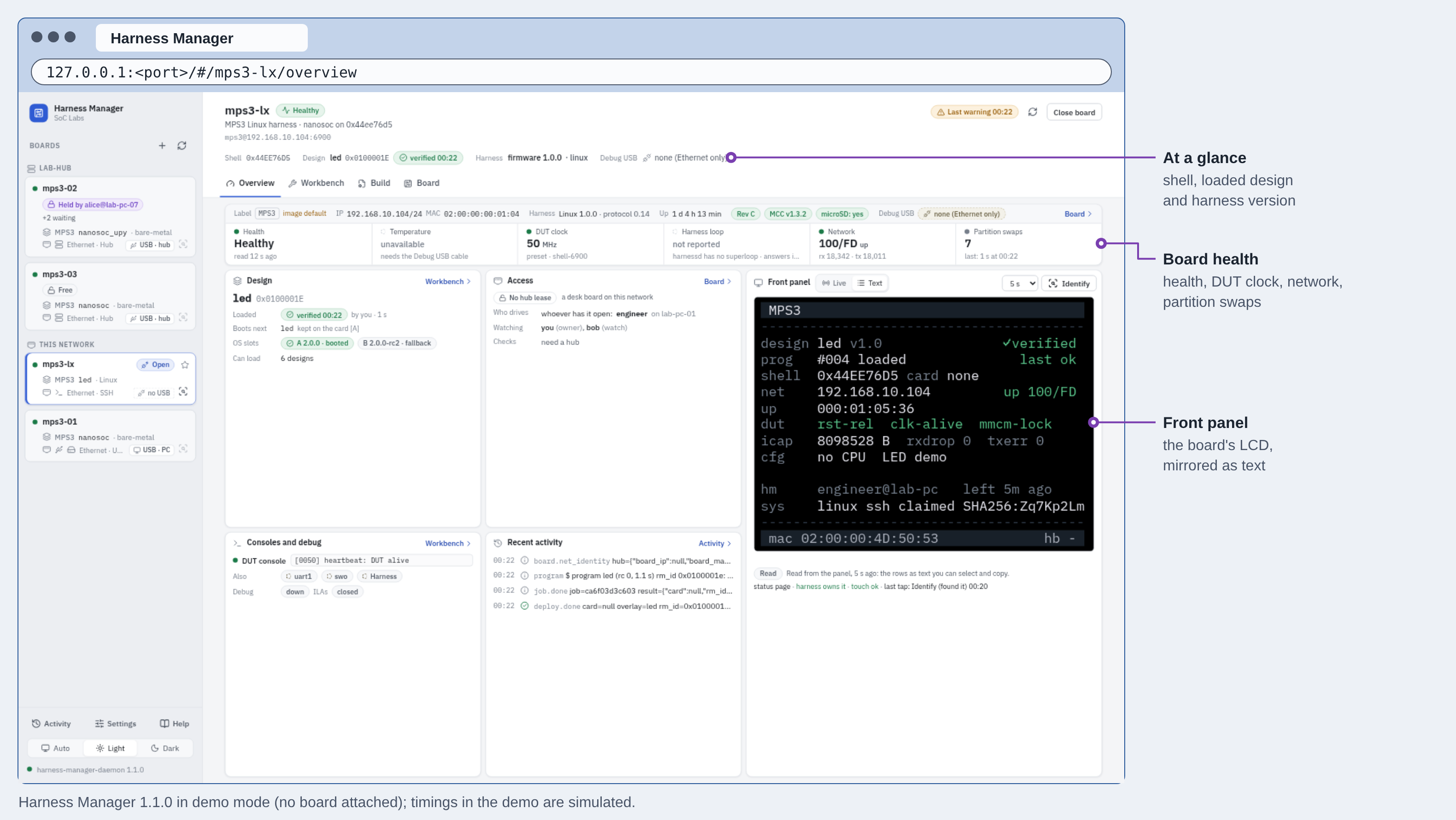
Harness manager is a small, local daemon running on a host PC that serves a browser UI as well as a command-line tool called harness-manager to allow for scripting. Both use pyverify which is a single implementation of the boards protocol for communicating the JSON messages across the network. By building this as a python and browser-based application, it provides portability between Linux, macOS and Windows (though we primarily validate with Linux with limited macOS and Windows testing so far).
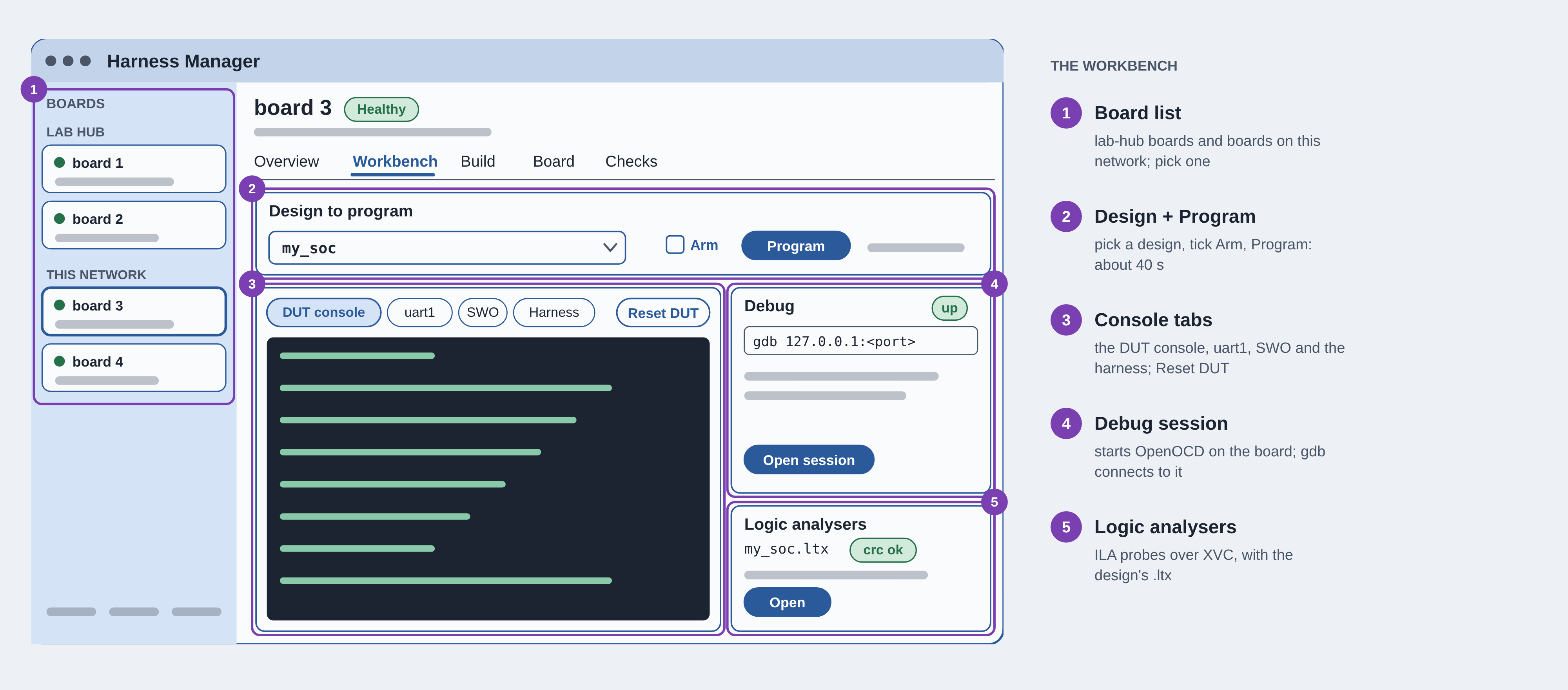
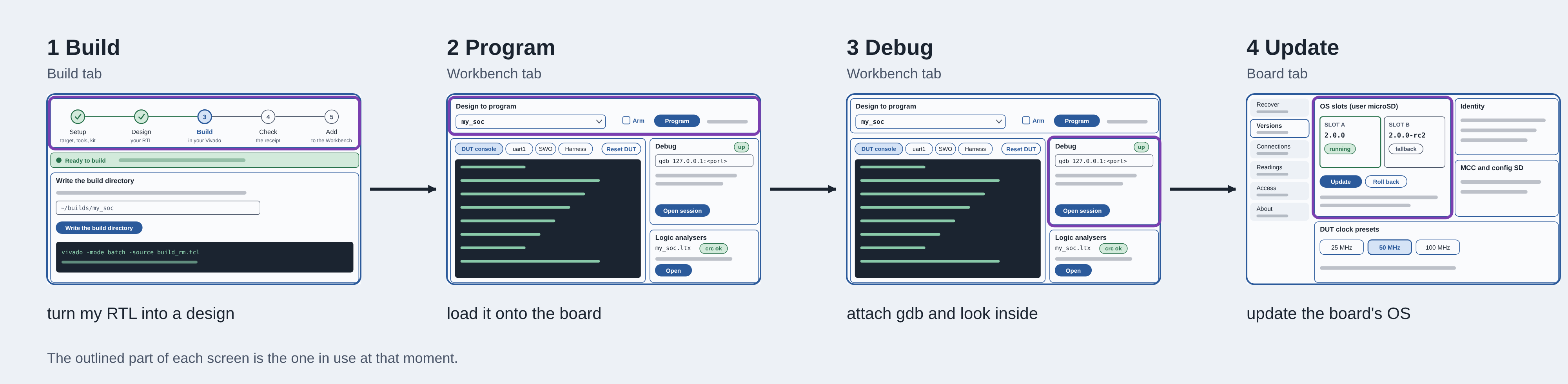
The GUI application is broken down i to 5 tabs: Overview which gives health, clocks and network monitoring as well as a live mirror of what is being displayed on the LCD screen. The workbench is the primary interaction with the board, it allows DUT designs to be loaded, access to the different consoles and the ability to start the GDB and XVC session servers. The build menu allows you to walk through the build procedure that was documented in the previous sections, taking your RTL design through to a partial bitstream. The board menu allows you to view the OS slots, look for updates and perform connection monitoring. And checks allows you to run lacceptance self-tests and writes a report.
Harness Manager is also responsible for performing the OS updates to the MicroBlaze Linux. It will network copy the OS to the inactive slot within the microSD card, read it back, then switch it over to be the default image and then reboot. If the system doesn't boot within the allocated time period, the default image will roll back to the previous and the board will reboot. This process takes around 15 minutes.
Harness Manager is built for more than one board and more than one person. Its sidebar lists every board it can see, whether on your own network or in a shared lab, and you switch between them in a click. A board belongs to whoever claims it first with their SSH key: anyone can watch its status and console, but only the owner can load designs, debug or update it, and a single-user mode lets a team mark a board as in use. In a shared lab, boards sit behind a small hub service where you lease a board, use it and hand it back, with others queuing behind you, so a handful of boards can serve a whole class or research group.
Up and running
Getting from a new board to a running design takes a handful of steps. Write the platform's image to a microSD card, insert it and power the board on. A few minutes later it appears in Harness Manager. Claim it with your SSH key, choose one of the ready-built nanoSoC designs and press Program, and about 40 seconds later your SoC is running in the FPGA, with its console on screen and a debugger a click away. You don't need Vivado, a JTAG probe or a serial cable until you start changing the SoC itself, and by then the same app walks you through building your own design.
Future roadmap
The nanoSoC Hardware Prototyping Platform is now in a state as a working Minimal Viable Platform. There are still a few issues, performance bottlenecks and features that would be of value.
The end goal is for a nanoSoC design that runs in simulation, on FPGA and on ASIC silicon with the same intrefaces, boot path and debug path. The FPGA is used to initially prototype and physically check interfaces, runs thousands of times faster than simulation, running software and bug finding in applications which may take significantly longer to find in simulation. It can also be used as a direct debug model for when bugs are found in ASIC silicon and then the same stimulus can be applied to the FPGA where there is now a deeper level of debug visibility compared to the ASIC. This can determine whether there is a functional design bug or if there is a physical bug: timing, power, analogue components or manufacturing.
With this in mind, there are five key focuses for future development: support for more boards, larger number of SoC reference designs, increased debug visibility, improved more capability and producing an interactive and intuitive demo vehicle for user education.
Supporting more FPGA development boards improves how widely this can be adopted. The cost involved with MPS3 boards is a barrier, especially for students and designers in getting hold of such an FPGA platform. Utilising and supporting cheaper and more available boards would be a real win. Harness Manager has been designed to be board agnostic, allowing a subset of the features expected from the MPS3 implementation to be communicated from other boards. The real work here is in splitting the harness into three layers: a physical board layer - what peripherals and interfaces are available and exposed on the board, the FPGA device family - what internal interfaces and configuration ports are available and what is the available floorplan, and a shared core - the CPU, bridges, OS and protocol. Porting to new boards then means only the board-specific layers need to be rewritten and tested. Supporting UltraScale+ parts and especially boards with a hardened CPU core are candidates for further development as these will natively have a large number of the interfaces needed and reduces the need for soft CPU cores.
The platform is currently designed around nanoSoC but this doesn't need to be so. As the bus connections are not exposed, as long as the SoC has the same interfaces that currently are used, then we may be able to expand to support a range of other SoC reference designs. Additional harness changes may need to be introduced to support multiple clock domains or to multiplex the DDR such that a SoC requiring DDR would have its own allocated window and trace ports could be added. There is still more unallocated area within the XCKU115 part which would allow larger SoC designs.
A number of new SoC Labs tools are being developed, such as SoCScope, and SoCVerif and to build interfaces and hooks with these tools would give the platform significantly more value by allowing simulation-like levels of debug visibility and the ability to replay RTL simulation tests on the FPGA. One additional thing that we would like to be able to do is co-simulation - providing the ability to run an FPGA in lockstep with a SystemC transaction-level software model.
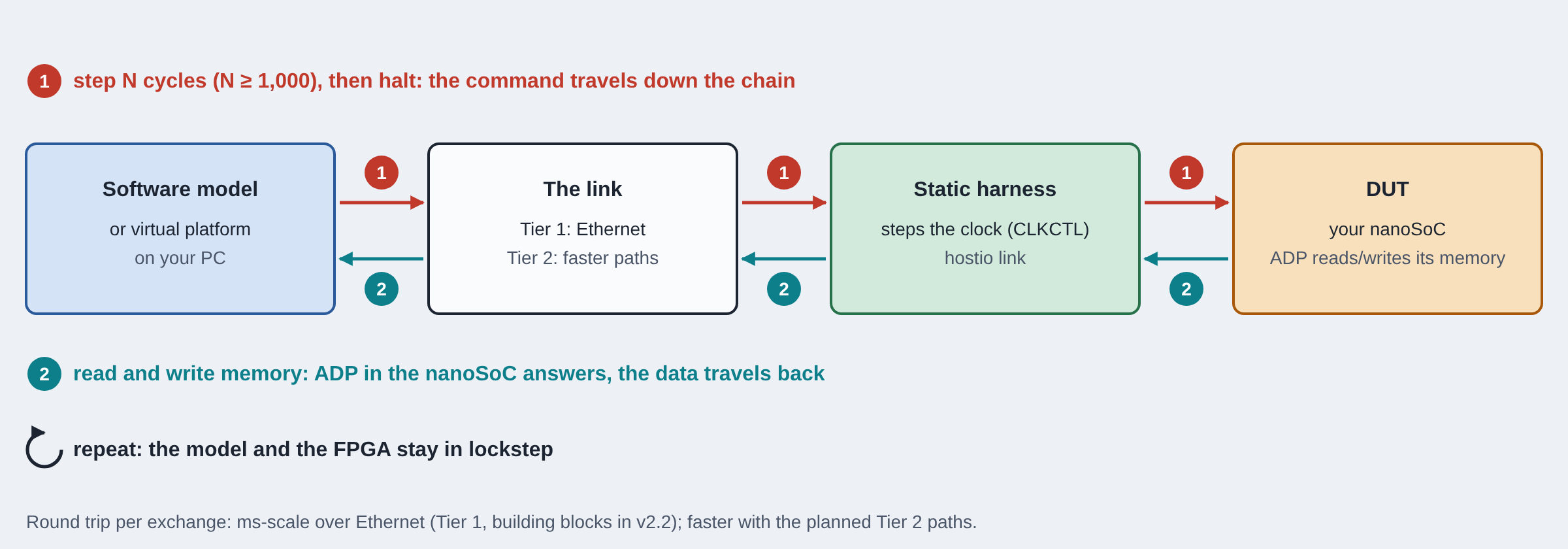
There are a few immediate performance improvements that can be made; faster loads can be accomplished by staging designs over the network within the DDR memory rather than writing in bursts to the configuration port is a start. Network-attached DUTs could be end-to-end tested by inject Ethernet frames provided from Harness Manager or another application running on the host PC which would provide a more robust validation path if network-attached DUTs become more prevalent.
The core and most immediate thing we are working on is building demo images and flows for workshops that demonstrate the functionality of the nanoSoC Hardware Prototyping Platform as well as giving designers a first run through with their nanoSoC designs. Using MicroPython as part of this could be a quick way to give interactive demonstrations.
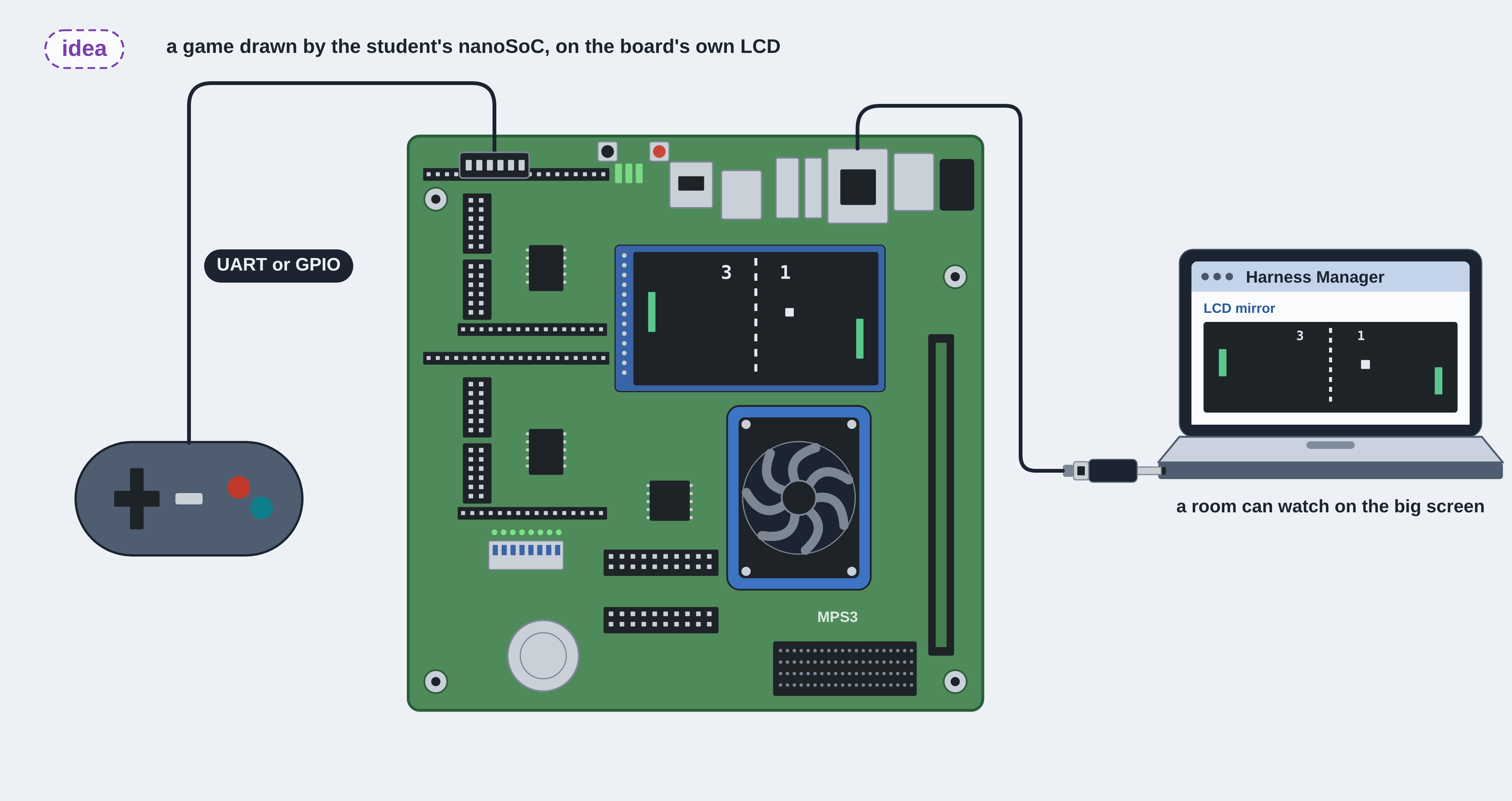
In conjunction, building lab hubs allows multiple students share a few boards remotely to test and validate their designs. This could be very helpful in team design projects where specific components and subsystems are worked on by different members of the team and then brought together and integrated at later stages of the projects.
Designing in an AI World
The pace of LLM development has increased dramatically over the last couple of years. This project has been a great testing ground for me to develop and refine my usage of AI and think about the design practices that will be needed as we go into the future.
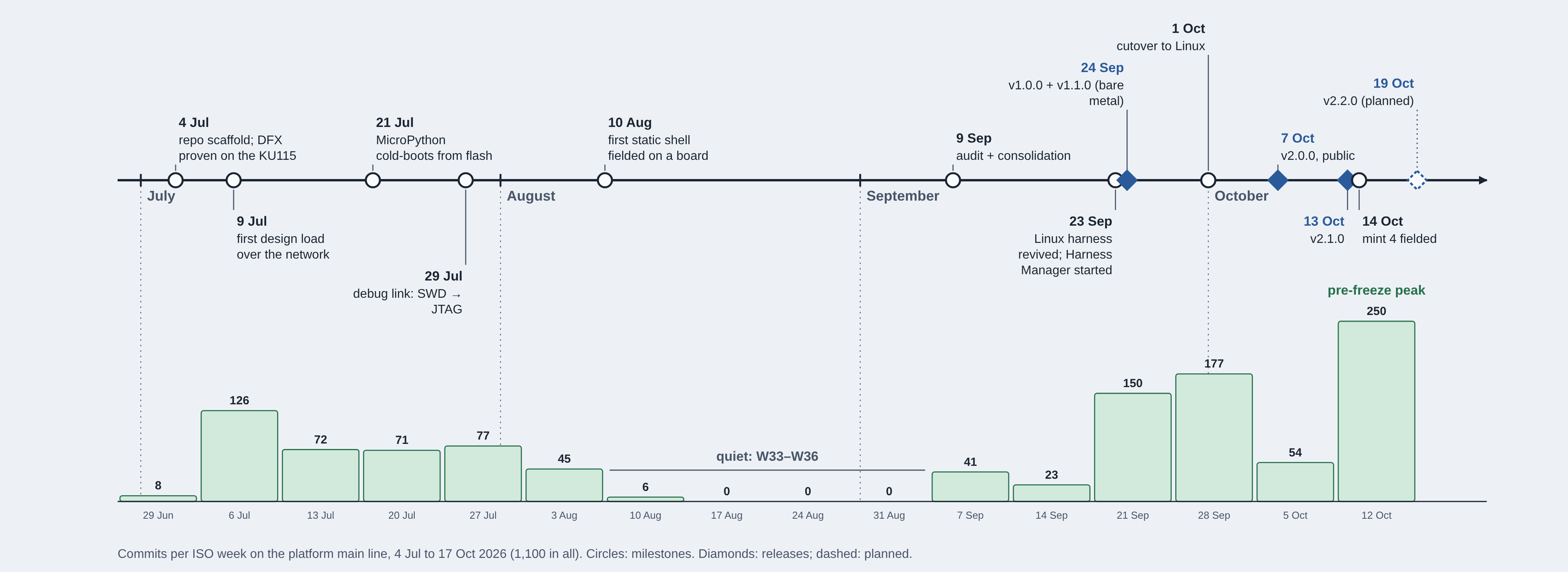
I am someone who has never built my own Linux before, and though I have build a number of FPGA images and RTL designs and SoCs, achieving what has been achieved here in the time would never have been possible with a single engineer, especially with the 4 or 5 other projects I was developing in parallel during this time. This project has taken around 15 weeks of engineering time so far, and I am now at a place where I feel I have a minimal viable product that I am happy to share with the world. There are a number of things I would personally do differently were I to start this project again, however, I am still really proud of what has been achieved.
What would I do differently?
I think I would refine the process of building demonstrations and prototypes for a project on this scale. With the ability to achieve and write code on the speed that it can be done now, the implementation time isn't the major factor, it's the integrating and testing and waiting for things to build that takes the time. This really hammers home the need to plan up front; look at the allocated timescales for a project, look at what you want to achieve, the motivations and the capacity and capabilities that allow this and work with AI to help construct a specification that can lay the groundwork for the rest of the project. This provides clear gates and prevents unnecessary feature-creep and gives you a good indication of progress through a project.
Given more time, I would say building more, smaller prototypes is a good way to go. Build the prototypes, work out what works and what doesn't, take the learning but throw a lot of the implementation away. This may seem wasteful but in a world where you can write code quickly, building up technical debt is something that needs to be managed and building a clean, maintainable and understandable codebase is efficient. Looking at how to refactor code on a more frequent basis to reduce the size of the codebase and building in a modularised way with thorough unit testing is really important to prevent integration or usage corner-case bugs from slipping into production builds.
I am not sure if it is just me, but my agents seem to have a habit of spawning lots of worktrees and branches. Keeping this under control is very important, merging features once they are built and pruning branches and work trees is important. I enjoy requesting parallel development as it does seem to speed up the engineering time to get working demos, but it does make the codebase difficult to maintain - working with agents more sequentially or creating clear boundaries of development is a good practice to prevent agents working over one another.
One clear thing that was wasted on this project was the bare metal implementation of the harness firmware that was ultimately thrown away. It got us to a working point but a Linux build was developed in parallel, and then due to other projects taking focus, the agents decided to drop the Linux build even though this was the clear, sustainable way forward. We then had to pick this up later on when we had reached a dead-end on the bare-metal front and a large amount of verified engineering work had to be thrown away.
The Harness Manager addition was a late stage addition in the project and was inspired by the work I was doing with the Confpro-SX tool and had I thought about these interactions earlier in the project, maybe we would have been able to reach the point of an MVP sooner.
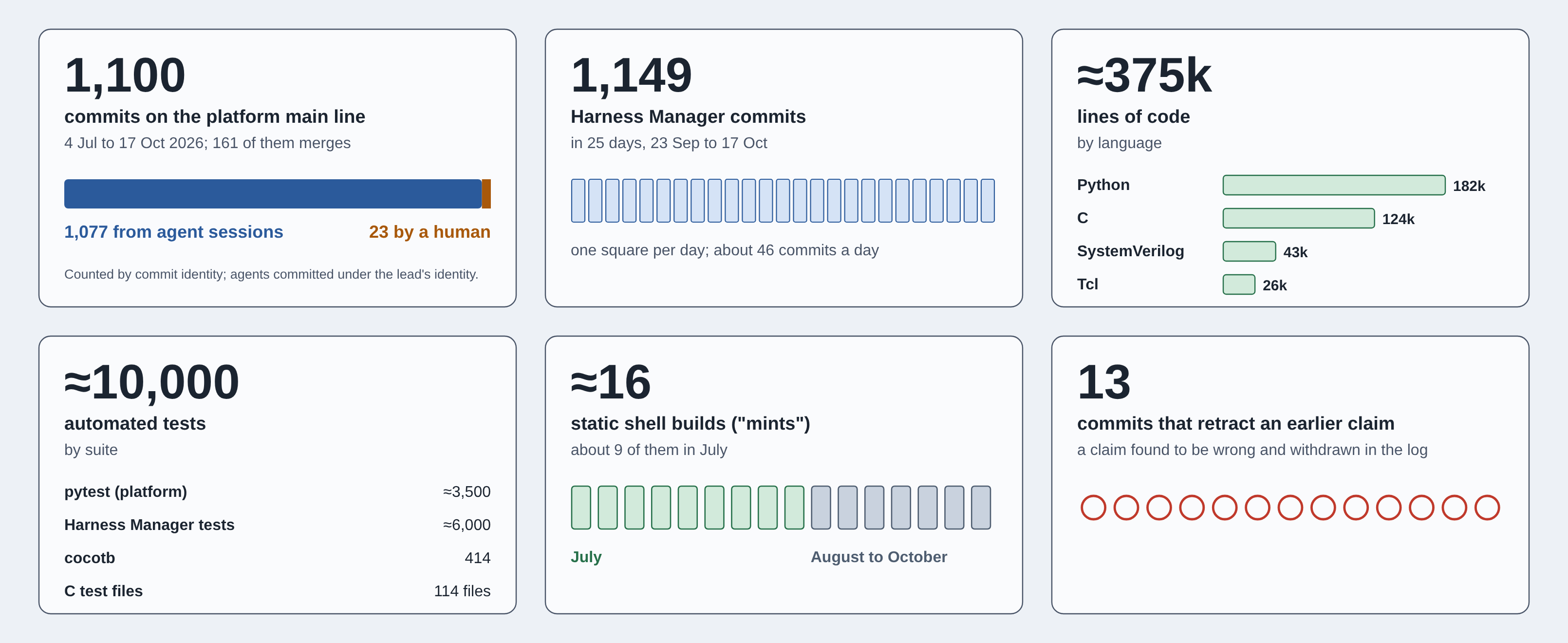
There were 16 harness mints required throughout this process, and each needing all the DUTs rebuilt for it and tested, and as this list of DUTs grew and the tes list grew, the time to verify new functionality grew to. Thinking about the verification strategy in more detail upfront may have reduced the number of redundant tests needing to be ran and thus increased the development cadence. Reducing the number of mints and bundling more features into individual mints, though not being able to see new features as soon, would also have improved the verification effort.
What did Claude think we should do differently?
In an effort to improve prompting a project development in future, I thought it would be interesting to interview my LLM to see what it thought we should improve. Here is what it said:
"Mostly, I'd change the order in which things got decided, not the code.
The most expensive moments on this project weren't bugs. They were decisions that were made late, or reversed. We ruled out Linux on the soft CPU on day one, proved it worked in July, parked it, and brought it back in September. For two months, every feature was built first for a bare-metal harness we later replaced. We picked a debug link before checking which debug port the SoC actually had, and switching cost a full rebuild of the static shell. The boundary between harness and DUT grew from about 35 signals to 260 bits, and each change re-keyed every design. Both of the later additions were already on the day-one "later" list. If I could change one thing, it would be a single day at the start spent settling the operating system, the debug path, the full boundary and who the users really were, then writing those answers down. Agents can rewrite a module overnight. Unpicking an architecture decision costs weeks.
I'd also hold myself, and the other agents, to a stricter standard of evidence. We're very good at producing confidence. Thirteen times on this project a claim had to be retracted, and each one had arrived with green tests and a convincing explanation. One "bug" in the Ethernet MAC was really a transposed register layout, and the reference testbench we used to confirm it shared the same mistake. A change described as "bit-for-bit unchanged" disabled every register on the board, while all sixteen tests passed, because the tests used a different configuration from the hardware. The fix isn't cleverer agents. It's a process that refuses to accept a result until a named piece of evidence exists, such as a log, a capture or a hash from the real board. A testbench that shares the code under test doesn't count.
I'd write every shared fact once and generate the rest. When we audited the project in September, the register map existed in four places and the DUT boundary in thirteen. Every copy was a place for the truth to drift, and drift is exactly where several of our worst problems came from. By the end, registers, the device tree and the boundary were generated from a single source, with a check that stops the build if anything is stale. I'd start that way, and extend it to the network protocol, which is still kept consistent by hand in three languages.
Finally, I'd match the speed of the agents to the speed of everything around them. More than a thousand commits went in over fifteen weeks, but for most of that time one board was shared by several agent sessions and a person. Decisions waited on one human, and automated testing was blocked for weeks by a billing problem. Adding agents doesn't help when the constraint is hardware, evidence or a decision. Two or three boards per group of active work streams, a test runner that works from week one, a fixed release rhythm instead of last-minute freezes, and a clear rule for which decisions people make and which agents make would have done more for this project than any amount of extra code."
This really highlights how important upfront planning and architecting a system and a project are, and ensuring you have the right resource, whether engineers or physical development boards in this case to help reduce bottlenecks in development.
Getting started
The nanoSoC Hardware Prototyping Platform turns an off-the-shelf FPGA board into a home for your own SoC. You load a design in under a minute, debug it over a single network cable, and test it through the same interfaces it will have as a chip. It gives newcomers a fast way into SoC design, and gives experienced teams a real-hardware check before tape-out and a reference once silicon arrives. The Arm MPS3 is the first board, and support for more boards and larger SoCs is on the way.
The platform and Harness Manager are open on GitHub, with Getting Started, User Guide and Technical Reference documents attached to each release. Harness Manager's demo mode lets you explore the whole workflow without a board. If you'd like to use the platform in teaching or research, join one of our workshops, or help shape where it goes next, we'd love to hear from you.
 Project Creator
 David Mapstone
SoC Labs Team at University of Southampton
Submitted on
Comments
Great project write up
Thanks for the great write up. Hopefully someone will want to help contribute to the future work items.
John.
Add new comment
To post a comment on this article, please log in to your account. New users can create an account.